Welcome back!

It looks fantastic! I discover it on my phone and it’s easier to watch and interact, I’m really excited and also a little lost with all the new features. At first I didn’t find my gallery 😄
I am exploring and it seems really cool 👍🏻
I guess it still better on the computer but the phone version is great. Thank you so much!

Just a thought; maybe a short tutorial for explaining us the new options and possibilities?😉
LOL it did take me a while to find the gallery too. And to find how to access someone's gallery when clicking on their username too. We all have to relearn things.

A tutorial would be nice.
 
One of the things I'm still looking for are the comments on layouts (those I got), but I'm sure we'll discover all those things within a week...
 
Well, I did find my Gallery. But where do I file my new layouts under? I can't find "member galleries" in the add-media content.
 
I placed it in the "Simply Sweet Scrapping." Hope I that's the correct way!
I don't find either how to add another categories when you want to post in many designers gallery in the same time.🤔
I just discover the weight for the page is bigger to upload, so cool and I just love the signature part, I can reduce it so easily!
I still looking the comments in my gallery (I mean all the comments in the same place lol). I guess we have to learn little by little.🥰
 
I don't find either how to add another categories when you want to post in many designers gallery in the same time.🤔
I just discover the weight for the page is bigger to upload, so cool and I just love the signature part, I can reduce it so easily!
I still looking the comments in my gallery (I mean all the comments in the same place lol). I guess we have to learn little by little.🥰
Robin was explaining to me that we can't post in several galleries anymore. But we have to use tags instead. Tag the several designers in your layout.
 
Robin was explaining to me that we can't post in several galleries anymore. But we have to use tags instead. Tag the several designers in your layout.
Ahhhhh okay it makes sense, I hesitate to add tags as I wasn't sure of the purpose lol. Thank you so much Lea! You still make me laugh with the mail I get when I woke up (a little late I admit).
 
One of the things I'm still looking for are the comments on layouts (those I got), but I'm sure we'll discover all those things within a week...
I posted a comment on one of your layouts. Maybe that will help you see what that did to notify you.
 
I don't find either how to add another categories when you want to post in many designers gallery in the same time.🤔
I just discover the weight for the page is bigger to upload, so cool and I just love the signature part, I can reduce it so easily!
I still looking the comments in my gallery (I mean all the comments in the same place lol). I guess we have to learn little by little.🥰
If you click the photo of your layout, you'll see a pop-up on the right with the words media-information, credits and Comments. If you click on it, the comments show.
 
If you click the photo of your layout, you'll see a pop-up on the right with the words media-information, credits and Comments. If you click on it, the comments show.
Thank you Petra!:giggle: I mean a page when you have all the comments on all your pages like we have before, see what I mean? I don't know if it's still exist?
 
Wow yes that is cool to be able to reduce the size of our signature with just dragging! Thanks for pointing that out.
You're very welcome! I found mine was too big now so I was so happy not to have to reduce it by another system!lol!
Do you know how we could add tags in a posted layout? I don't manage to add tags with editing my last one!
 
It seems great but I'm having one small problem.

I can't spend more than 5 minutes on the site because of vision issues. It is too bright for me. And, the pink and white are very close in shade for me. I'm getting a headache because of it right now. I'll have to come back later.

Any chance we can have more style preferences that don't include this shade of pink? How abut letting us use dark mode on the site?
 
It seems great but I'm having one small problem.

I can't spend more than 5 minutes on the site because of vision issues. It is too bright for me. And, the pink and white are very close in shade for me. I'm getting a headache because of it right now. I'll have to come back later.

Any chance we can have more style preferences that don't include this shade of pink? How abut letting us use dark mode on the site?
I second making dark mode accessible if possible, due to my migraines I have everything set to dark mode!
 
I have a question about the gallery.
Since I always use double pages, my pages have always been displayed in such a way that my entire LO could be seen in the gallery.
Now, however, only an extraction is shown.

Screenshot-2026-03-01-231151.png


I´m sad, that my pages don't look good this way.

I have now copied my last LO onto a new white square background. But it would be nice if I didn't always have to do this and if the display in the gallery was adjusted accordingly.
 
I have a question about the gallery.
Since I always use double pages, my pages have always been displayed in such a way that my entire LO could be seen in the gallery.
Now, however, only an extraction is shown.

Screenshot-2026-03-01-231151.png


I´m sad, that my pages don't look good this way.

I have now copied my last LO onto a new white square background. But it would be nice if I didn't always have to do this and if the display in the gallery was adjusted accordingly.
If there's no solution on the site's side, the only thing I can think of is 'cutting' your layouts into 2 separate squared layouts (a left and a right one) and upload those 2 next to each other. Good luck!
 
I have a question about the gallery.
Since I always use double pages, my pages have always been displayed in such a way that my entire LO could be seen in the gallery.
Now, however, only an extraction is shown.

Screenshot-2026-03-01-231151.png


I´m sad, that my pages don't look good this way.

I have now copied my last LO onto a new white square background. But it would be nice if I didn't always have to do this and if the display in the gallery was adjusted accordingly.
I'm looking into this for you now.
 
Will we be able to create our own tags again? And do we need to delete all duplicate layouts in our galleries ourselves?
 
Last edited:
And @HavaDrPepper I'm curious if your browsers or OS have some accessibility settings for this?
Something like this might work in Chrome: https://chromewebstore.google.com/detail/dark-mode/dmghijelimhndkbmpgbldicpogfkceaj?hl=en&pli=1
Dark Mode is an accessibility setting windows. I use it but have found that some sites do not use dark mode unless they have a setting in preferences that you check. It is just a simple checkmark to "use system settings". If I have dark mode in my system settings, the site shows in dark mode. If I turn off dark mode, the site will also change to regular settings.

I saw that Robyn said the colors are the same as the old forum but for some reason they do not seem that way to me. The pink text is way too light for my chronic dry eyes (with the start of cataracts).
 
I have a question about the gallery.
Since I always use double pages, my pages have always been displayed in such a way that my entire LO could be seen in the gallery.
Now, however, only an extraction is shown.

Screenshot-2026-03-01-231151.png


I´m sad, that my pages don't look good this way.

I have now copied my last LO onto a new white square background. But it would be nice if I didn't always have to do this and if the display in the gallery was adjusted accordingly.

Mone, I've got a solution for you! It requires a couple extra steps on your part, but if it's important to you to see the full 2-page layout spread in your thumbnails, it's an option.

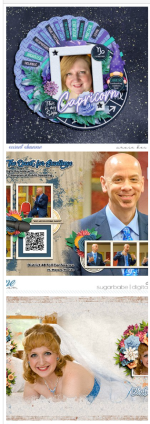
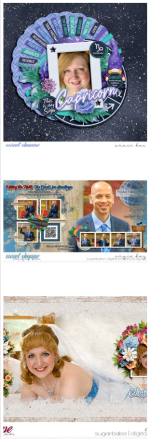
Here's how a 2-page layout I created shows up in my gallery:

Screenshot 2026-03-02 163037.png

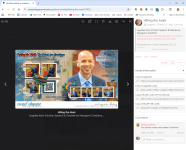
So I click on the layout, and it brings up the detail view:

Screenshot 2026-03-02 163118.png

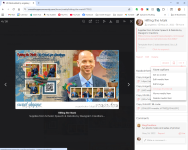
On the right side on the screen, you're looking for the row of buttons that begins with Watch. On the right end of that row, click on the drop-down button with the three dots, and the "More Options" pull-down menu appears. Click Change thumbnail.

Screenshot 2026-03-02 163219.png

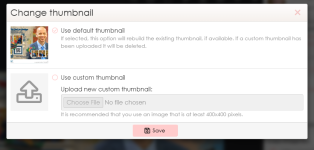
The system gives you two options: Use default thumbnail, or Use custom thumbnail. Change it to custom, and then upload an image of your 2-page spread that's square with a white background at the top and bottom.*

Screenshot 2026-03-02 163311.png

Then click Save.

When you back out to your gallery, your custom thumbnail now appears!

Screenshot 2026-03-02 163446.png

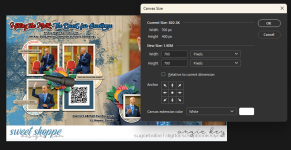
* I know it's an extra step to save your layout thumbnail... The quick and easy way to do this in Photoshop is - with the JPG of your 2-page spread that you've uploaded to the gallery open - navigate to Image ... Canvas Size. Change the number in Height to the same as the number in Width. Make sure the Anchor field is set to the center of the layout, and that Canvas Extension Color is set to white.

Screenshot 2026-03-02 163710.png

Click OK, and your newly-square 2-page layout will appear. Then just Save for Web like you normally would.

Screenshot 2026-03-02 163722.png

I hope this information helps!
 
Mone, I've got a solution for you! It requires a couple extra steps on your part, but if it's important to you to see the full 2-page layout spread in your thumbnails, it's an option.

Here's how a 2-page layout I created shows up in my gallery:

View attachment 676227

So I click on the layout, and it brings up the detail view:

View attachment 676228

On the right side on the screen, you're looking for the row of buttons that begins with Watch. On the right end of that row, click on the drop-down button with the three dots, and the "More Options" pull-down menu appears. Click Change thumbnail.

View attachment 676229

The system gives you two options: Use default thumbnail, or Use custom thumbnail. Change it to custom, and then upload an image of your 2-page spread that's square with a white background at the top and bottom.*

View attachment 676230

Then click Save.

When you back out to your gallery, your custom thumbnail now appears!

View attachment 676231

* I know it's an extra step to save your layout thumbnail... The quick and easy way to do this in Photoshop is - with the JPG of your 2-page spread that you've uploaded to the gallery open - navigate to Image ... Canvas Size. Change the number in Height to the same as the number in Width. Make sure the Anchor field is set to the center of the layout, and that Canvas Extension Color is set to white.

View attachment 676232

Click OK, and your newly-square 2-page layout will appear. Then just Save for Web like you normally would.

View attachment 676233

I hope this information helps!

Thanks for your efforts!
I already did that with Photoshop for my last upload.

But for my old pages, I will adjust the thumbnails.
 
Back
Top