Cool new features!

ok so I think if we want to receive notifications of a new comment on our layouts we need to hit the Watch button for each layout we post

or... to be tested

go to your account preferences and choose
Content options
  • Automatically watch content you create…
Ouch 😣
 
What are we using for just adding a layout to Member gallery? I like to put my layouts just in my gallery first and foremost in case a designer leaves, or a challenge system leaves. I never post to any other gallery but my own first. So, is there a member gallery or what are we using?

Just so you all know, I HATE change and this is giving me some anxiety...so, show kindness if it has already been addressed elsewhere.
Hi, Dawn! I think the easiest way to do this is when you're prompted to "Add Media To..." a particular group, scroll to the bottom of the list and choose Add Media to Existing Album.

The next screen should come up with a single album showing 4 thumbnails of your most recent layouts. When you hover over it, you should see a pop-up with your username. That's the album for you and all your layouts. Simply click it and go!

Thank you for your patience as we learn this new system together. We as Babes are learning and exploring right alongside all the rest of y'all. We'll be creating tutorials in the coming days, for sure; in the meanwhile, post your questions and we'll either find the answer or if it's something that needs to be fixed, add it to the "punch list."
 
I can't even seem to upload a layout. :cry: My image is black when I choose the "upload file" option. This is too stressful for me right now. I think that I'll wait a few days and try again.
 
Hey, ladies - have you discovered all the ways you can customize your personal profile yet?

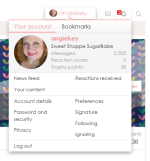
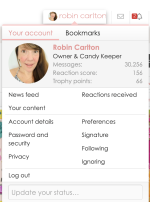
In the upper right corner next to the messages and alerts icons, you'll see your user name. Click on it, and you'll get a pull-down menu. Then click on your user name in the pop-up, to the right of your photo:

Screenshot 2026-03-01 183941.png

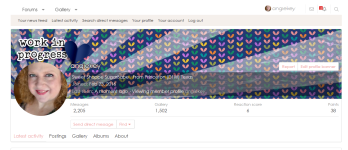
That'll show you your Profile page. To edit it, click on Your Account in the grey menu bar at the top.

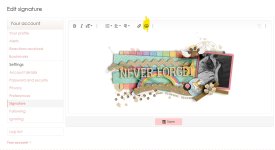
Not only can you easily edit your avatar photo as previously discussed, but you can upload a Profile Banner that appears at the top of your profile screen as well as in the hover pop-up whenever anyone hovers over your userID. I had fun playing with it!

Screenshot 2026-03-01 184227.png
 
I can't even seem to upload a layout. :cry: My image is black when I choose the "upload file" option. This is too stressful for me right now. I think that I'll wait a few days and try again.
Lynn, I'm very sorry that you're at a point of frustration with this! May we reach out to you in a couple days to check and see if you're still having the issue and troubleshoot it? It could be anything from something with your browser to something with your user account; we'll need Robin's help to investigate, and she'll be back tomorrow.
 
I seem to be having an issue with following just my post. For challenges, I click my post and create a bookmark just for that, so that I can edit it quicker. But currently, even though I bookmarked my personal post, when I click on it, it brings me to the full thread, but near my post. Not sure if this is happening for everyone or if it's just me.
 
Lynn, I'm very sorry that you're at a point of frustration with this! May we reach out to you in a couple days to check and see if you're still having the issue and troubleshoot it? It could be anything from something with your browser to something with your user account; we'll need Robin's help to investigate, and she'll be back tomorrow.
I didn't even think about the browser. I opened Edge? (the blue swirl that looks like a "C") and it shows the image when I started an upload. It didn't work for me with Firefox. Thanks, Angie! I'll try uploading my layouts tomorrow with the "C" browser.
 
Hey, ladies - have you discovered all the ways you can customize your personal profile yet?

In the upper right corner next to the messages and alerts icons, you'll see your user name. Click on it, and you'll get a pull-down menu. Then click on your user name in the pop-up, to the right of your photo:

View attachment 676102

That'll show you your Profile page. To edit it, click on Your Account in the grey menu bar at the top.

Not only can you easily edit your avatar photo as previously discussed, but you can upload a Profile Banner that appears at the top of your profile screen as well as in the hover pop-up whenever anyone hovers over your userID. I had fun playing with it!

View attachment 676103

I loveee this feature!!
 
I seem to be having an issue with following just my post. For challenges, I click my post and create a bookmark just for that, so that I can edit it quicker. But currently, even though I bookmarked my personal post, when I click on it, it brings me to the full thread, but near my post. Not sure if this is happening for everyone or if it's just me.
I managed to bookmark just my post (by clicking on the number and then bookmarking it) - does this take you to my post in March's thread, or do you see something different?


It takes me right here when I click on it:
Screenshot 2026-03-01 at 9.05.37 PM.png
 
Yes, I understand that changes are always difficult at first, but over time we adapt and realize that they lead to progress. Some issues I've seen here may find a solution, and others may not. The old system was no longer receiving updates and was full of bugs that were hindering the workflow behind the scenes — and believe me, it takes A LOT of work to keep the whole community running.

Change isn’t easy for any of us either, but we understand that, just like in life, some changes are necessary. That’s why I believe that if everyone is patient and embraces the changes, that will be the special ingredient that keeps the community united.

And it’s only been one day — phew!!! There are still adjustments to be made, and we know that some things that existed in the previous system may not be available in this one. But stay calm — we’ll have an FAQ soon, and the gallery will be fully configured shortly. After all, everything went live before the details were finalized so that we can all learn together using the new tools that are now available.
 
Yes, I understand that changes are always difficult at first, but over time we adapt and realize that they lead to progress. Some issues I've seen here may find a solution, and others may not. The old system was no longer receiving updates and was full of bugs that were hindering the workflow behind the scenes — and believe me, it takes A LOT of work to keep the whole community running.

Change isn’t easy for any of us either, but we understand that, just like in life, some changes are necessary. That’s why I believe that if everyone is patient and embraces the changes, that will be the special ingredient that keeps the community united.

And it’s only been one day — phew!!! There are still adjustments to be made, and we know that some things that existed in the previous system may not be available in this one. But stay calm — we’ll have an FAQ soon, and the gallery will be fully configured shortly. After all, everything went live before the details were finalized so that we can all learn together using the new tools that are now available.
You said that in such a beautiful way! :love:
I agree, I think we need to give ourselfs time to adapt to the new features.
 
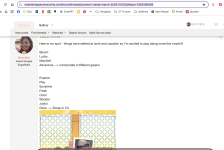
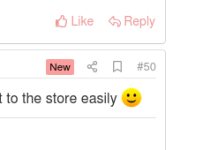
plus, I can easily find my post in a thread; I just have to use the bookmark, so cool!
(it's the flag next to the number post)

tag.png
 
I really like how clean it looks. And I love the statistics on the right side. So fun.
 
What a pleasure all these changes! I was "desesperate" not being able to like a comment (a way to say thank you) or reply to it
using @ in front of the name, which was not working before.

And you can attach a file! Instead of using postimage. This is really great!

I'm so happy, to me, this way the forum is much friendly and I deeply appreciate the changes. Thanks a lot!

Only one remark: in the gallery, my pages appear several times.
 
What a pleasure all these changes! I was "desesperate" not being able to like a comment (a way to say thank you) or reply to it
using @ in front of the name, which was not working before.

And you can attach a file! Instead of using postimage. This is really great!

I'm so happy, to me, this way the forum is much friendly and I deeply appreciate the changes. Thanks a lot!

Only one remark: in the gallery, my pages appear several times.
Those are probably pages you posted in different designer galleries in the old gallery.
I have those as well. I got a tip from Charlene to delete the duplicates on the first page of my gallery.
 
I'd like to know about this too. @Robin Carlton
I covered this in today's lots to learn thread here, but essentially the gist is...

In the gallery especially, there are some compatibility issues and features that just didn't merge well. The images and usernames are all here and available for commenting and bookmarking, but things like your favorites lists weren't imported because XenForo doesn't use them. It uses a bookmark system where you can bookmark the threads and images you want to come back to again.
 
I covered this in today's lots to learn thread here, but essentially the gist is...

In the gallery especially, there are some compatibility issues and features that just didn't merge well. The images and usernames are all here and available for commenting and bookmarking, but things like your favorites lists weren't imported because XenForo doesn't use them. It uses a bookmark system where you can bookmark the threads and images you want to come back to again.
So our previous favorites are gone, no way to retrieve them?
 
Unfortunately, no. It's not a data category that transfers over because it's handled entirely differently . I'll ask our migration guy to see if he has any ideas, but I think it's a bit of a longshot. If I find anything helpful out, I'll let you know.
Thanks for looking into it for us, Robin! Here's hoping! 🤞
 
I seem to be having an issue with following just my post. For challenges, I click my post and create a bookmark just for that, so that I can edit it quicker. But currently, even though I bookmarked my personal post, when I click on it, it brings me to the full thread, but near my post. Not sure if this is happening for everyone or if it's just me.
how do you access what you've bookmarked?
 
but oh my gosh! Do you know what this means?? It means I don't have to have a gazillion tabs open in my browser for things I always need to come back to! woah!!
 
When I saw four copies of my siggie in my gallery, I deleted one and they are all gone now. Having read this forum, I understand why there were duplicates. HOWEVER, I uploaded my siggie again to the Forum Signatures album, and now, no matter what I try, I cannot add it to my profile. I have EDIT SIGNTURE open, but nothing is working. Can anyone help me please?
 
Back
Top