Upload category question

LenaGardner

New member
My layout needs to go into 3 categories. Not "should" but has to...it's a collab between two designers I create for, and I'm required to put it in both categories per my CT requirements, but I'm also doing a TOTM lift. What do I do?
 
Yep, and you don't have to choose "member gallery" as one because it copies there anyway. So you should be able to choose 3 with no problem. :)
 
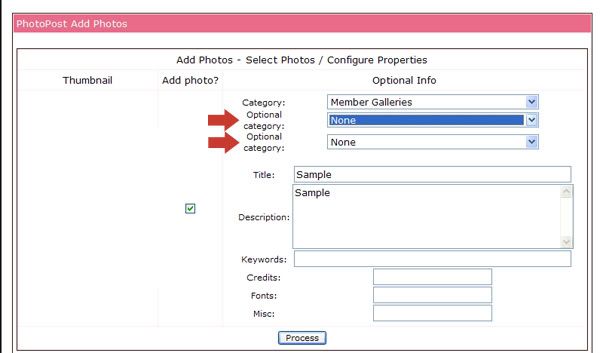
Another options is when you get to the second page of your LO upload, there is an option to choose up to two more galleries. You don't have to go back and edit! I thought I'd mention that since everyone was suggesting the edit method and that step can be eliminated :)

Here is a screen shot of page two of the upload process and the option to add up to add 2 extra categories.
upload.jpg
 
Yep, I pretty much never use the Member Gallery since I'm always doing challenges and I love that I can chose more galleries on the second page. :thumbup:
 
Which way makes it not show more than one LO in your gallery? I'm having trouble w/ that and it's making me nuts.
 
Jen, when you're uploading...make sure you do NOT upload to your Member Gallery AND then another one. It will automatically show in your gallery anyway and uploading it in both is what gives you the extra copies. HTH!!
 
Thanks, Sara. I'm pretty sure I was only uploading to 2 designers and then a challenge, but I need to double check that I wasn't doing member. Thanks! :D
 
Yeah, like Sara said, anytime you upload to more than one gallery it shows up for each gallery you added (up to 3 total). When I first started posting here, I didn't realize they automatically showed up in "member galleries", so I went back and deleted some of my multiples.
 
Back
Top