Silhouette digital craft cutter anyone?

supertwinkle

New member
I got the Silhouette digital cutter a couple of months ago, and I've been playing with it. It is PERFECT for digital/hybrid scrappers and card-makers. Does anyone else have this machine, and what have you made with it?

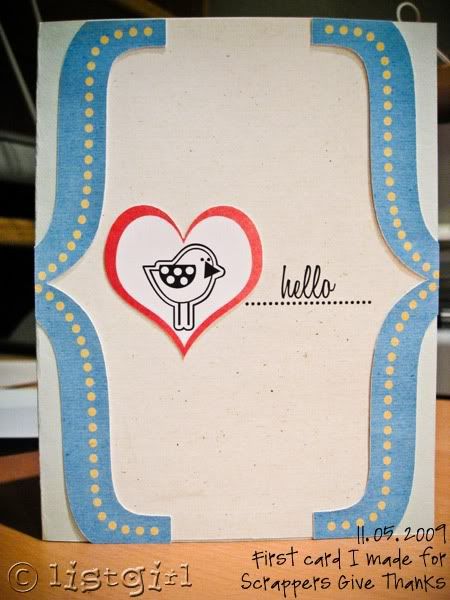
I used the "print & cut" function and had it cut out pieces of my greeting card, after I designed them digitally in Photoshop, with digital papers and elements.
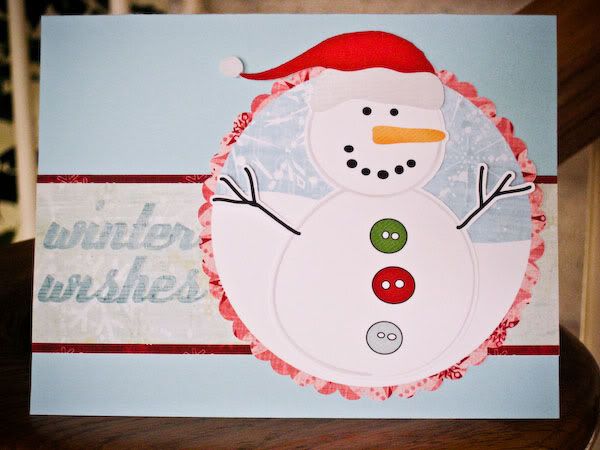
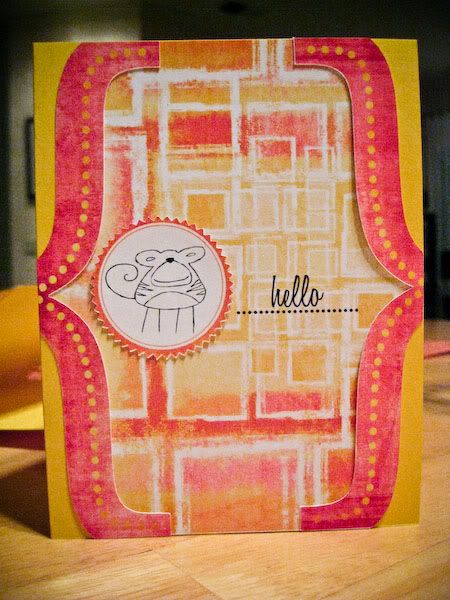
20091113-IMG_0936_600.jpg


20091114-IMG_0972_600.jpg


309_20091103-IMG_0866_600_journal.jpg

This one I actually showed the process on my blog.

Anyone else have the Silhouette? I love it so far. I'm interested to see what you've made with it!
 
Your cards are great!
I wish I had a Silhouette for myself (Can you hear me, Dear Santa? LOL)
Does this machine cut ANY shape/font or just the shapes/fonts that come with it already?
xoxo
 
I don't have one, but I want one really really badly;) Off to check out your blog to see more of your lovelies!
 
Your cards are great!
I wish I had a Silhouette for myself (Can you hear me, Dear Santa? LOL)
Does this machine cut ANY shape/font or just the shapes/fonts that come with it already?
xoxo

I have one! It will cut any true type font out there...I love it! I will have to show you later some of the things we have cut with it...but right now "lunch break" for robotics competition is over and I have to get back in there... we cut out titles for our "Display Booth" for robotics, spirit & sportsmanship signs, and the "vinyl cling" advertising our team on the side of our van!!! You can do other shapes too...just use the outlining tool and cut...
 
I have been drooling over one since I saw the first things you posted on your blog. I should have asked for one for Christmas.
 
I got one in March, but to be honest I haven't really had much time to play with it. Hopefully that will change after New Year's.
 
It comes with 50 shapes. You can make your own shapes in PS or any other graphics program and import them into the Silhouette software using the "get outline" function. They also have an online store with thousands of shapes, and you can download each one for $1.99.

I think the most revolutionary function for digi-people is the "print & cut" function though. It means we can design a greeting card/layout digitally in PS, PSE, PSP, or whatever software you use. Then just drag the different pieces onto a 8.5x11 new document. Save it as a hies jpeg for printing. Then you would import the jpeg into the Silhouette software. There's a couple of steps, but the gist of it is, you print it out through the Silhouette software with the cutting registration marks on it. Then you just stick your printout onto the sticky cutting mat and the machine will cut all the pieces out for you!

I'm making some kraft treat bags for the holidays. I'll be back with photos when those are done.
 
I have one, I haven't tried the print and cut feature but now I really want to, your cards are awesome! I need to figure out how to use jpeg with their software, if anyone has tips I'd love to hear them!
 
Very cute!!!
I actually like doing the cutting out myself. It's never perfect, but I like hte homemade feel it gives. At least to me, lol.
I did think about getting one, but since I'm getting rid of my Cricut, it seemed like a waste.

I am however, getting a die cutter and a bunch of Spellbinders for Christmas. Those I can't wait to play with! :)
 
I've had a craft robo for about 5 years which is similar to this as well as a Cricut and a big shot and I never use any of them - I prefer my scissors as they are so much quicker. By the time I had done all the fiddly stuff on the cutting machines I could have made the entire card :)
 
I have a Gazelle cutter and love it! Yesterday I cut out awareness ribbons out of purple vinyl for my nephew's hockey team to wear on their helmets in a tournament as a tribute to my dad who passed away from pancreatic cancer Oct. 25 of this year. It was so easy to cut them with the cutter. I wouldn't hesitate to recommend a cutter to any crafter.
 
Here is my van... it took 2 rolls of vinyl adhesive to do both sides...plus the back has a few "gears" on it and a small robot. If you make the letters a bit smaller...you could get away with just 1 roll.

200910Fallpicsmall.jpg


I cut out "MHR" our team name abbreviation out on the robot's chest.:)
 
Thats neat! I wanted to do something for the car, but I wasn't sure if the regular vinyl I have would work. I did a Welcome for my front door, but it gets the afternoon sun and is starting to bubble from the heat.

Here is my van... it took 2 rolls of vinyl adhesive to do both sides...plus the back has a few "gears" on it and a small robot. If you make the letters a bit smaller...you could get away with just 1 roll.

200910Fallpicsmall.jpg


I cut out "MHR" our team name abbreviation out on the robot's chest.:)
 
I have one! It will cut any true type font out there...I love it! I will have to show you later some of the things we have cut with it...but right now "lunch break" for robotics competition is over and I have to get back in there... we cut out titles for our "Display Booth" for robotics, spirit & sportsmanship signs, and the "vinyl cling" advertising our team on the side of our van!!! You can do other shapes too...just use the outlining tool and cut...

Here is my van... it took 2 rolls of vinyl adhesive to do both sides...plus the back has a few "gears" on it and a small robot. If you make the letters a bit smaller...you could get away with just 1 roll.

200910Fallpicsmall.jpg


I cut out "MHR" our team name abbreviation out on the robot's chest.:)

OMGEEE! I SO wanna one Silhouette right now... Maybe this Xmas? Who knows? A girl can dream... :p
 
You can purchase vinyl from JoAnn's, Hobby Lobby, most craft stores...I just ordered the purple I needed for the hockey team from www.hhsignsupply.com. They are located in Ky and seem to have quick shipments. I ordered late Tuesday and had my order Thursday. Women in some of the Yahoo cutter groups have talked about getting scraps from local ign companies for next to nothing if not free! I have not contacted my local sign shops but will be.
 
All great tips! I love the vinyl on the car, it turned out great!
I was thinking of doing some vinyl wall art too, but I haven't ventured into vinyl yet. Just the regular shapes and the "Print & Cut" has kept me pretty busy, LOL.
 
The Silhouette is on sale at www.ittybittyscrapshack.com for I believe $99. Contact the owner if the price is not listed as that in the store and ask her about it. She ships things fast! She actually riuns the Wishblade Yahoo group where if you sign up you can sign up for their gsdfiles site for tons of free files!
 
I got the Silhouette SD last week from Overstock.com for only $150. It came home yesterday, I can't wait to play with it :)
 
I had a Wishblade and could NOT figure out how to get the dumb thing to do anything!!! It was NOT user friendly. I got rid of it. Is the Silhouette better and easier to use? I really want SOME kind of cutter...
 
The Silhouette and the Wishblade are exactly the same machine...both are manufactured by Craft Robo...they just have different company branding.
 
I used my silhuette for the first time yesterday and worked great. it come with very easy to follow instructions
 
All great tips! I love the vinyl on the car, it turned out great!
I was thinking of doing some vinyl wall art too, but I haven't ventured into vinyl yet. Just the regular shapes and the "Print & Cut" has kept me pretty busy, LOL.

Thanks! It sure is noticeable! I parked in a rather large parking garage on Monday and forgot where I parked the van ... it was kinda dimly lit in there...but the letters almost GLOWED and I saw my van 3 rows over and down a bit instantly!

I want to do a vinyl wall art as well...my sister has a "framed" thing that says "always remember to kiss me goodnight" or something like that...it's either that or "never forget to kiss me goodnight" (hmmm will have to ask her) ... so thinking I will do this in vinyl for my wall!
 
I had a Wishblade and could NOT figure out how to get the dumb thing to do anything!!! It was NOT user friendly. I got rid of it. Is the Silhouette better and easier to use? I really want SOME kind of cutter...

I had a few friends that had the wishblade (an older version) and had the worst trouble getting it figured out ... I think they may have simplified it since then....

...then about 2 years later (maybe) another friend figured it out and could cut the coolest stuff...loved the "rollercoaster" die cut she cut with it...it was cool ... and lots of layered titles..
 
Back
Top