Sharpening your layouts

Leablahblah

Well-known member
I have an action to resize my layout and sharpen to post on forums but I'm wondering what you all do to sharpen the text. I seem to lose resolution in word bits or journaling when I resize.

Can you share your tips and settings?
 
I myself haven't found a good way to sharpen the text after I resize. I save my layouts in 3 different sizes and adjusting the text for every single size would take extra time for sure which I'd rather spend on creating another layout :)

If there is a quick way, I would love to know about it though :)
 
When I switched to a mac from a pc laptop, I couldn't get my saves right at all. I finally adjusted a save to web action for the settings I wanted. I still see it looking slightly blurry on my monitors depending on where I'm working. But I'm assured from others they don't look that way to them.

It occurs to me that might be zero help. But maybe yours looks crisp and clear to others too?
 
When I switched to a mac from a pc laptop, I couldn't get my saves right at all. I finally adjusted a save to web action for the settings I wanted. I still see it looking slightly blurry on my monitors depending on where I'm working. But I'm assured from others they don't look that way to them.

It occurs to me that might be zero help. But maybe yours looks crisp and clear to others too?

Can you share with us the settings you're using?
 
Hmmm. I don't use anything and I never seem to have any blurriness, at least none that any one has pointed out.

I I use File>Export>Save for Web legacy
I use optimize file size for under 350KB and size my layout at 700x700 pixels
 
I'm confused, if you're flattening the layout before you sharpen, why would the text not get sharpened with the rest of the layout?
 
I'm confused, if you're flattening the layout before you sharpen, why would the text not get sharpened with the rest of the layout?

That's what I initially thought. The layout is flattened, everything should be sharped. At least that's how I do it and I don't notice my alpha being blurry--if anything it's more crisp and legible for reading online, even when I don't want it to be! :blink::w00t:
 
Hmmm. I don't use anything and I never seem to have any blurriness, at least none that any one has pointed out.

I I use File>Export>Save for Web legacy
I use optimize file size for under 350KB and size my layout at 700x700 pixels

Kiana, do you know that you can save your layouts in 500kb now for the SSD gallery ??? Your layouts will be better quality that way :)
 
Kiana, do you know that you can save your layouts in 500kb now for the SSD gallery ??? Your layouts will be better quality that way :)

Do you resize it to 700x700 first?
Then do you use the "save for web & device" option? Or a different method?
Thanks. :o
 
Do you resize it to 700x700 first?
Then do you use the "save for web & device" option? Or a different method?
Thanks. :o

I resize my layout to 700x700, I run a sharpening action I created myself via a turorial by Traci Reed (which I cannot find anymore, so sorry) and after that I use the 'save for web' option.
 
I resize my layout to 700x700, I run a sharpening action I created myself via a turorial by Traci Reed (which I cannot find anymore, so sorry) and after that I use the 'save for web' option.

Thanks! I had scouted the site when I joined up and found instructions about that. (I had never known about the "save for web" option prior to that.) When you pull up "save for web," do you choose "optimize to file size" and input 500? I've been putting 149, 'cause I thought that was the maximum we could use to post here.
 
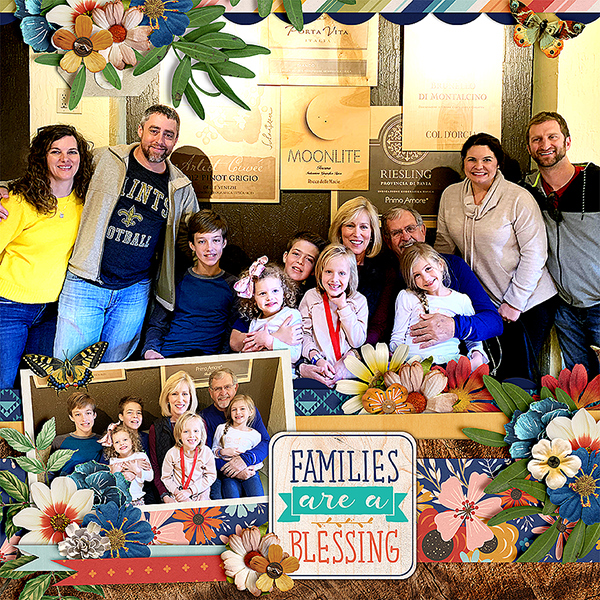
So I've been really unhappy with my own sharpening method lately, so I downloaded and used Cheryl's action today for the first time. Here's the finished product:
web_Branson-Family.jpg

To me, it feels a little too sharp, like the faces are a bit distorted. But maybe it's just me. Is there a way to adjust it to taste?
Also, it resized it to 600x600 instead of 700x700. Any way to change that?
 
Sometimes I feel like my page looks too sharp too, so I try to lower down the opacity and fill to 70/60 or until I reached the look of the page where it's not too sharp.

To me, it feels a little too sharp, like the faces are a bit distorted. But maybe it's just me. Is there a way to adjust it to taste?
Also, it resized it to 600x600 instead of 700x700. Any way to change that?
 
Thanks! I had scouted the site when I joined up and found instructions about that. (I had never known about the "save for web" option prior to that.) When you pull up "save for web," do you choose "optimize to file size" and input 500? I've been putting 149, 'cause I thought that was the maximum we could use to post here.

That is exactly what I do but I enter 499kb...just under the file size limit :)
 
To me, it feels a little too sharp, like the faces are a bit distorted. But maybe it's just me. Is there a way to adjust it to taste?
Also, it resized it to 600x600 instead of 700x700. Any way to change that?

I hope i can explain this :)

You can collaps the Action and then you'll see this...

2P1t1al.jpg


First you are going to remove the line 'flatten image' from the action. Click on that line and then hit the delete icon (little trashcan). Confirm with OK.

After that you are going to want to change the 600x600 to 700x700. Double click on 'image size' (the one on the last line in the action, see green line underneath it) and then you can change it to 700x700...

qEqNkvx.jpg


click OK and you should be ready to go :) Best to close the layout you just flattened and reopen it (I always save my flattened layouts as psd file). Now run the action and if all went well, you should have two layers now (whereas before you only had one layer)..

VJjAnSS.jpg


You can select the grey layer now and change the opacity so the layout is not so sharp. I usually save my at 50%. I hope this helped you out :)
 
I too made an action- I'll have to take a screenshot of it for you. It basically flattens, opens info box to add credits, resizes, sharpens & saves. I made the same action for 600x600, 700 & 900 (the three sizes I use)
 
I have my font set to small- so hopefully you can read it! ;) Also- I guess I have 2 separate actions- one for flatten/info/save (fullsize) then the web sized actions. lol

 
So I've been really unhappy with my own sharpening method lately, so I downloaded and used Cheryl's action today for the first time. Here's the finished product:
web_Branson-Family.jpg

To me, it feels a little too sharp, like the faces are a bit distorted. But maybe it's just me. Is there a way to adjust it to taste?
Also, it resized it to 600x600 instead of 700x700. Any way to change that?

Outside of messaging Cheryl and asking her, I wouldn't know how to alter an action.
 
So I've been really unhappy with my own sharpening method lately, so I downloaded and used Cheryl's action today for the first time. Here's the finished product:
web_Branson-Family.jpg

To me, it feels a little too sharp, like the faces are a bit distorted. But maybe it's just me. Is there a way to adjust it to taste?
Also, it resized it to 600x600 instead of 700x700. Any way to change that?
If you look at the steps in the action palette, just click the box on the left and it will bring up the command as it's going through the action and you can adjust that step to your liking. HTH!
 
Kiana, do you know that you can save your layouts in 500kb now for the SSD gallery ??? Your layouts will be better quality that way :)

Ooooohhh YAY!!! bigger size. Will try to remember that!!!!:hugs:
 
Last edited:
Thank you, Biancka, for going into such great detail!

Unfortunately, in PSE, I don't have the ability to alter the steps like you can in the full program. But maybe I could resize mine and layer it after I run the action.
 
Thank you, Biancka, for going into such great detail!

Unfortunately, in PSE, I don't have the ability to alter the steps like you can in the full program. But maybe I could resize mine and layer it after I run the action.

You are most welcome :) !
 
Back
Top