Photoshop help

ChristineF

Active member
So I want to start using Photoshop for my scrapping, but have no diea where to start. I'm such a newbie that I can't even understand how to get started by using the tutorials found here.
How do I load papaers and embelishments onto a template/into photoshop?
Is there any digiscrapping for dummiens tutorials out there?

Thanks in advance.
 
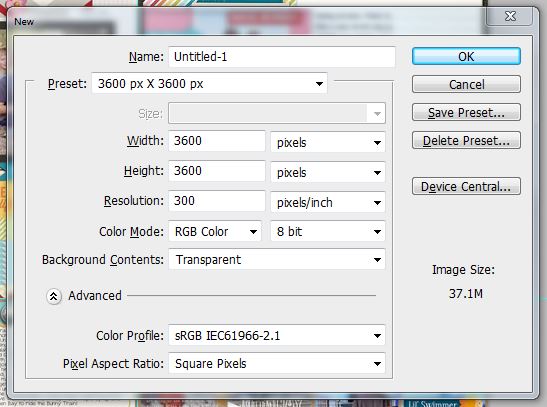
I think one of the easiest things is to search on youtube for some vids to watch. It's so easy once you get the hang of it. I create a 12x12 document, open up bridge to view and drag over the products. I used PSE before for scrapping but felt more comfortable using PS since that is what I use for editing and I'm more familiar with it.
 
Like this:

new.JPG


Then you should be able to drag your pieces into that canvas & move around :D
 
Honestly the best way to learn is just to play around with the program -- you won't break anything :) Most of the buttons in PS tell you what they are if you hover over them. Look through the drop down menus to get familiar with the features. We do have tutorials for beginners, so I would start with those (here is a link to the "Getting Started" section for PS. I agree with the previous poster that youtube is also a good resource. Good luck! It may seem overwhelming at first, but if you consistently use it over the next few weeks, you'll get the hang of it.
 
Oh, I remember when I just started trying to learn how to use Photoshop. To learn the basics of the different tools youtube is great. For specific scrapelated techniques the SSD tutorial section is awesome.
 
Back
Top