Whatever category system you decide to use in ACDSee, make sure you will always be able to keep up with tagging everything. I started with tagging everything in my kits: colors, type (subtype), theme, designer, store,... In the beginning it was awesome because I was a mix and match scrapper too. But then I started joining a couple of CT's again and the kits came much quicker than I could tag them. And eventually I became more of a kit scrapper as well, so I didn't need that extensive category strcuture anymore. Tagging every element and paper in a kit takes a lot of time and devotion. The results are great but the work it takes easily becomes too much when you really want to just scrap!
Are there any typical elements or papers you regularly search for? Tag those. Mine are white solids, wood backgrounds and newspaper backgrounds. Another thing I often search for is a particular frame, so I try to tag my frames as round - rectangular - square if I have time.
Apart from that, I now only tag my previews, templates and alphas.
For previews I tag the colors, the theme and the designer and under previews I have a subcategory called 'not used yet'.
For alphas I tag the colors and the type (acrylic, wood, narrow, chunky, blocks, circular, stamped,...) This has helped me a lot because I often search for the right alpha after my page is finished and by then I usually have an idea of what type of alpha I need.
For templates I tag the number of photos. If it's a double page template I tag that as well. And I also tag them if they're from one of my favorite template designers.

You will see that the more you use ACDSee, the more you will find out what works best for you. Scrap a few pages like you normally would and write down the things you look for and want to find easily.
Hope that helps!



 ) but need to tackle it over my time off this year so that when I do have a moment of time to scrap I can. I have Windows 7 and ACDsee Photomanager 2009. I tend to mix and match especially with elements. What tips do you have as I have probably around 100gb to organize - HELP!!!!


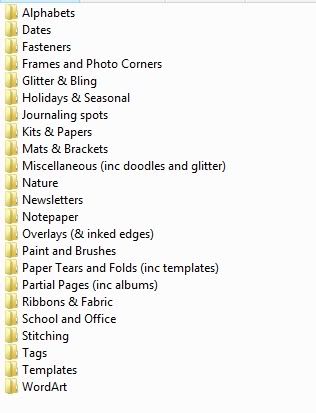


 ):
):


