May 2017 - Bingo FAQ

Sherly

Sweet Shoppe SugarBabe Lead
If you have any questions regarding THIS month's Bingo challenges, please post them here.

We have a wonderful team and community here at SSD....
so someone is sure to get back to you ASAP with answers to anything and everything related to our Challenge Bingo system!

Here is this month's card for easy reference:
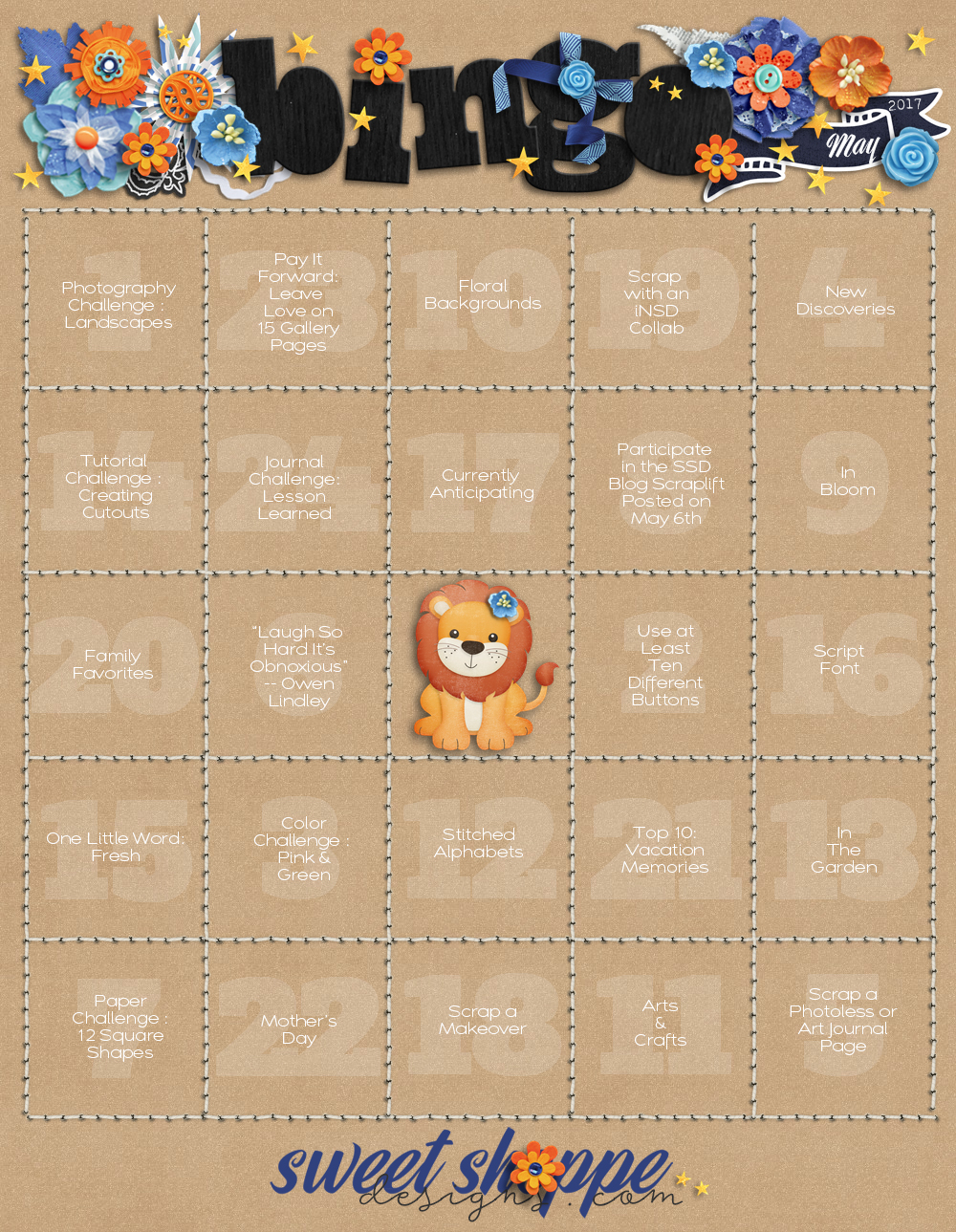
May2017_Bingo.jpg

Happy Scrapping!
 
Pay it Forward?

I always leave love when I post a layout but do we also scrap a page about it? How do we get that one done on the card?
 
Last edited:
#19: Scrap with an iNSD collab [International Scrapbooking Day- it's the first weekend in May]... You can scrap with ANY collab that is released on May 5/6th. This includes the THREE Sweet Shoppe Store Collabs that will release that weekend!

#14: Tutorial Challenge - Creating Cutouts
... See Here

#23: Pay it Forward - Leave Love on 15 Gallery Pages... You leave love on 15 layouts in the gallery and then post the link to each in your tracker thread.
Use the place marker below to "hold" that spot on your card ♥
First click on the image and then right click and save as a .png file.

 
Last edited:
#19: Scrap with an iNSD collab [International Scrapbooking Day- it's the first weekend in May]... You can scrap with ANY collab that is released on May 5/6th. This includes the THREE Sweet Shoppe Store Collabs that will release that weekend!

#14: Tutorial Challenge - Creating Cutouts
... See Here

#23: Pay it Forward - Leave Love on 15 Gallery Pages... You leave love on 15 layouts in the gallery and then post the link to each in your tracker thread. I'll create a marker [coming soon!] that you will then use "hold" that spot on your card ♥

thank you!
 
Im in doubt with #17 Currently anticipating, I was thinking about scrapping my 50 bday this year (November) but Im mot sure if that's what you meant.
 
Im in doubt with #17 Currently anticipating, I was thinking about scrapping my 50 bday this year (November) but Im mot sure if that's what you meant.

That's a great one to tackle that challenge, Roxana :) I will say go ahead :)
 
Other than the alpha in the scrapbook free kit from iNSD - do you guys know of any other stitched alpha?
 
Thanks girls, I found a few after do a different search. For some reason at first my search wasn't showing any but the new scrapbook freebie with purchase kit.
 
I need some help girls -- I bought some kits with stitched alpha and it is in a single sheet -- so my question: how do you get the alpha "cut apart"?

I am still learning and this is something I have never figured out.
 
I need some help girls -- I bought some kits with stitched alpha and it is in a single sheet -- so my question: how do you get the alpha "cut apart"?

I am still learning and this is something I have never figured out.

There is a tutorial that shows how to use full sheet alphas HERE. Hope this helps. If you are still having problems, though, just let us know. :)
 
I can't find the May 6th Blog Scraplift... can you direct me? Thanks!

Somehow I totally got the date wrong for this challenge :o It should read the 7th, instead of the 6th. The Scraplift Challenge posts on the first Sunday of each month on the SSD Blog. This month it's a little different, as the lift selection process is part of the iNSD challeges. You can check out all the details HERE.
 
I have a -silly- question to ask... but can we use the layouts we did for the NSD games for the bingo too? Of course, only if they match. TIA
 
I have a -silly- question to ask... but can we use the layouts we did for the NSD games for the bingo too? Of course, only if they match. TIA

Yes, that should be ok, since we didn't specify anything about it.
 
Somehow I totally got the date wrong for this challenge :o It should read the 7th, instead of the 6th. The Scraplift Challenge posts on the first Sunday of each month on the SSD Blog. This month it's a little different, as the lift selection process is part of the iNSD challeges. You can check out all the details HERE.
I was trying to post my layout on the blog but the link won't go through.

What kind of makeover can it be for challenge #18?
 
Last edited:
I was trying to post my layout on the blog but the link won't go through.

What kind of makeover can it be for challenge #18?

It probably went through, just needs to be approved by Kim (one of the sugarbabes that is in charge of the blog). So, don't worry about it.

As for makeover, it can be a page about you having a hair makeover or house makeover or garden makeover. I hope that helps.
 
#19: Scrap with an iNSD collab [International Scrapbooking Day- it's the first weekend in May]... You can scrap with ANY collab that is released on May 5/6th. This includes the THREE Sweet Shoppe Store Collabs that will release that weekend!

#14: Tutorial Challenge - Creating Cutouts
... See Here

#23: Pay it Forward - Leave Love on 15 Gallery Pages... You leave love on 15 layouts in the gallery and then post the link to each in your tracker thread. I'll create a marker [coming soon!] that you will then use "hold" that spot on your card ♥

I was going to ask how to scrap the pay it forward challenge, but I found my answer. Thank you Loni!
 
You should be getting your coupon soon, Lea :) I think the iNSD makes everyone so busy that it is a bit delayed.
 
Brand new (Just signed up 2mins ago) and I have a question, I'm sure it's been asked before and is probably easily found somewhere I didn't look yet. I'm wondering if the Free collections on the site (under Free Samples, I think) can be used for these challenges? Thanks so much!
 
Brand new (Just signed up 2mins ago) and I have a question, I'm sure it's been asked before and is probably easily found somewhere I didn't look yet. I'm wondering if the Free collections on the site (under Free Samples, I think) can be used for these challenges? Thanks so much!

Hello and welcome to SSD!:hugs:
Yes, you can use the free samples as well as any designers' freebies for the challenges, so long as the designers are still selling here. Looking forward to see your pages and participation around here.
 
the Pay It Forward Place Marker for challenge #23 is posted in my original thread HERE
thank you! but for some reason I can't save it. It ends up being corrupted. Anybody else has this problem?

edit: I managed to just drag it into photoshop and then erase the background around it.
 
Last edited:
I right click and then do save image as.

What is the tracker thread where we save the links to our comments. I don't get that?
 
I think something's getting corrupted via the image host... If everyone can wait a few hours, I'll have Robin host the image through the site & that should take care of the problems ;)
 
Back
Top