

You are using an out of date browser. It may not display this or other websites correctly.
You should upgrade or use an alternative browser.
You should upgrade or use an alternative browser.
March 2018 - Bingo FAQ
- Thread starter lingovise
- Start date

Sherly
Sweet Shoppe SugarBabe Lead
what is "Bingo with the Babes"?
Bingo with the babes is the weekly thread where we, the Babes (the store CT members), posted the pages we made for the Bingo challenges in the hope that we can help/inspire people in tackling the challenges.
SSD members are welcome to also post the pages they scrapped in order to complete a pattern on their bingo cards in the thread so that we all can leave comments on each other's pages.

imperio
New member
Bingo with the babes is the weekly thread where we, the Babes (the store CT members), posted the pages we made for the Bingo challenges in the hope that we can help/inspire people in tackling the challenges.
SSD members are welcome to also post the pages they scrapped in order to complete a pattern on their bingo cards in the thread so that we all can leave comments on each other's pages.
I always had that question in mind but wasn't sure and felt hella silly for asking

I like this month's bingo... I am so dying to try it out again... I so hope to find some time to do it :crying::crying:

girlonmac
New member
Bingo with the babes is the weekly thread where we, the Babes (the store CT members), posted the pages we made for the Bingo challenges in the hope that we can help/inspire people in tackling the challenges.
SSD members are welcome to also post the pages they scrapped in order to complete a pattern on their bingo cards in the thread so that we all can leave comments on each other's pages.
thanks for the info!!!!! fun!
Sherly
Sweet Shoppe SugarBabe Lead
I always had that question in mind but wasn't sure and felt hella silly for asking
I like this month's bingo... I am so dying to try it out again... I so hope to find some time to do it :crying::crying:
Aww Maddie, don't feel silly to ask any questions you have in mind. We are here to help you. :hugs:
Size question? I mainly scrap 12x12, however my first grandbaby is due next month and I'm doing an 8.5x11 photo book of my daughter-in-law's pregnancy progress, ultrasound pics, baby shower pics, etc. Can the 8.5x11 layouts be used for challenge purposes if it fits the theme? Thank you!

Leablahblah
Well-known member
Size question? I mainly scrap 12x12, however my first grandbaby is due next month and I'm doing an 8.5x11 photo book of my daughter-in-law's pregnancy progress, ultrasound pics, baby shower pics, etc. Can the 8.5x11 layouts be used for challenge purposes if it fits the theme? Thank you!
I don't see why not!
Other question: I need inspiration for the ad inspired challenge. As anybody posted anything yet? Not sure where to start.

lingovise
Sweet Shoppe SugarBabe
Size question? I mainly scrap 12x12, however my first grandbaby is due next month and I'm doing an 8.5x11 photo book of my daughter-in-law's pregnancy progress, ultrasound pics, baby shower pics, etc. Can the 8.5x11 layouts be used for challenge purposes if it fits the theme? Thank you!
8.5 X 11 pages are absolutely fine

lingovise
Sweet Shoppe SugarBabe
Other question: I need inspiration for the ad inspired challenge. As anybody posted anything yet? Not sure where to start.
There were some really great pages done for Rebecca's Web Inspiration Challenge last month. You can choose to use a print ad [like those found in publications], or a web based ad... really it's just about finding something out there that inspires you ♥

jacinda
Sweet Shoppe SugarBabe
For the ad challenge, I look at ads and work out which ones would easily translate to a scrapbook page. Everyone is attracted to something different, but as an example, these are the ones that suit my style, and that I'd look at lifting:
The 3 photos with subtitles and journalling on colour blocks underneath
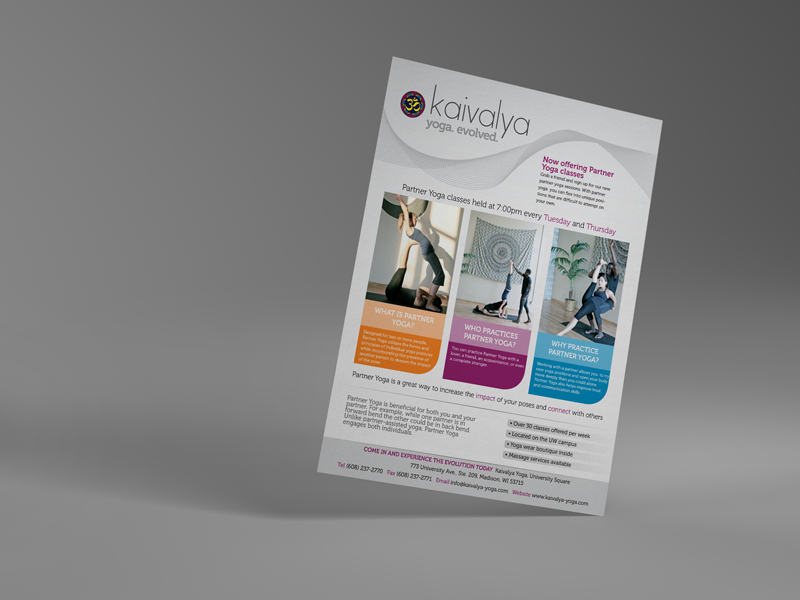
Big photo with a photostrip on the side

Kind of like pocket scrapbooking here. I'd add more blocks.

Keeping it simple. Large photo with journalling underneath.

Hope that helps
The 3 photos with subtitles and journalling on colour blocks underneath
Big photo with a photostrip on the side
Kind of like pocket scrapbooking here. I'd add more blocks.
Keeping it simple. Large photo with journalling underneath.
Hope that helps
Leablahblah
Well-known member
Ah yes thank you! It's just hard for me because placing my elements is always so hard and I'm a template scrapper! I'll try my best!
jacinda
Sweet Shoppe SugarBabe
Ah yes thank you! It's just hard for me because placing my elements is always so hard and I'm a template scrapper! I'll try my best!
Then this is the perfect challenge for you, because depending on the ad you lift, you may not even have any elements to place. You could just end up with photos, a title and some journalling.


dagi
New member
Yes Dagi. That's what it is.
thank you :wub:

Sherly
Sweet Shoppe SugarBabe Lead
Can someone give me an idea or two what "Square 24 Spring Cleaning" could be? I'm struggling on that one! Thanks much!
Maybe a page about you weeding the garden to welcome spring? Or cleaning up a specific room? Or cleaning up your HD/computer maybe?
I'll try to see if I can scrap a page about this prompt soon

Leablahblah
Well-known member
Can someone give me an idea or two what "Square 24 Spring Cleaning" could be? I'm struggling on that one! Thanks much!
This is mine
https://www.sweetshoppecommunity.com/gallery/showphoto.php?photo=500765&title=spring-cleaning&cat=500
We moved and the place was disgusting so that was my Spring cleaning since it's almost Spring! lol

Leablahblah
Well-known member
i have a question for the spring cleaning can be about a room renovation?? and can someone give me an idea for the 20 Tranquil, i have to make a layout about something that make me fell tranquil or use that word in journal????
For tranquil any of those two ideas you mentioned would work.
And I would think a room renovation could work for the Spring cleaning. Maybe mention cleaning in your journaling
ladies? Would you agree?
I have a question myself.
"lucky charms"
Besides the obvious St Patrick's day, what could it be about? I don't have any bracelets with charms so I can't go that route...
Sherly
Sweet Shoppe SugarBabe Lead
i have a question for the spring cleaning can be about a room renovation?? and can someone give me an idea for the 20 Tranquil, i have to make a layout about something that make me fell tranquil or use that word in journal????
What Lea said. You can scrap about the room renovation and maybe focus on the cleaning part.
Both ideas you mentioned about tranquil will work
Sherly
Sweet Shoppe SugarBabe Lead
I have a question myself.
"lucky charms"
Besides the obvious St Patrick's day, what could it be about? I don't have any bracelets with charms so I can't go that route...
Maybe you can scrap about your hubby and your kids as your lucky charms, Lea? It might be easier to go down that route?
Leablahblah
Well-known member
Maybe you can scrap about your hubby and your kids as your lucky charms, Lea? It might be easier to go down that route?
Yes I might do that! Thank you Sherly!
ScrappyShann
New member
First time doing the Bingo Challenge and participating in forums....so I have a couple of questions:
1) the center square - can we literally upload any layout we want here? I tried to search this question before I asked, but didn't see anything about it
2) if I want inspiration (or explanation) for a certain square - should I post something here? Or create a new thread?
1) the center square - can we literally upload any layout we want here? I tried to search this question before I asked, but didn't see anything about it
2) if I want inspiration (or explanation) for a certain square - should I post something here? Or create a new thread?
Sherly
Sweet Shoppe SugarBabe Lead
1) the center square - can we literally upload any layout we want here? I tried to search this question before I asked, but didn't see anything about it
It depends on which pattern you are aiming. If you are doing a black out (i.e., doing all the challenges on the card, then you can leave the middle one empty as a bonus.
Otherwise, you can pick any one of the challenges on the card to put it in the middle to complete the pattern you chose.
You can look at how others have done it last month, HERE.
2) if I want inspiration (or explanation) for a certain square - should I post something here? Or create a new thread?
You are welcome to ask in this FAQ thread if you need inspiration/explanation. Each month there will be a new FAQ thread like this one, where members can ask questions about the new month's bingo card. I hope my answer clarifies it.

KimGeling
Member
I have a question about the signature that may seem a little dumb but how do you get it to be centred under the post? As you can see mine is aligned to the left and I would like it to be in the middle. Is it something you do when you make the signature or is there a setting I have missed?
ScrappyShann
New member
If you click on "quick links" then "edit signatures" you should see the button that allows it to be centered right below the font. I'm sure you have to highlight it first, but then clicking that button should work.I have a question about the signature that may seem a little dumb but how do you get it to be centred under the post? As you can see mine is aligned to the left and I would like it to be in the middle. Is it something you do when you make the signature or is there a setting I have missed?
ScrappyShann
New member
I downloaded the font but I don't know how to use it. Do I have to install it somewhere? How do I select the letters to get them on the page?Here's a bit of extra information on a few of the prompts that might help you get started :
#2: Get Griddy...
Create a page that is laid out in grid pattern.
#3: Stay Classy Font...
Click on the image below to download the font and then use it on your page.
#6: Participate in the SSD Blog Scraplift posted on March 4th...
On the first Sunday of each month, Sugarbabe Kim B. hosts a Scraplift challenge on the SSD Blog.
You have the entire month to play along and complete your page.
#14: Pay it Forward - Leave Love on 15 Gallery Pages...
You leave love on 15 layouts in the gallery and then post the link to each in your tracker thread.
Use the place marker below to "hold" that spot on your card ♥
First, click on the image below ... then right click that image and save as a .png file.
#21: Ad Inspired...
Draw inspiration from an advertisement and create a page that mimics it's design layout.
#22: Update Your Photo & Create a New Siggie...
This one is super easy... all you need to do is update the photo you use in the forum and create a new forum signature ♥
#23: Paper Challenge - Rings...
Create a page using ring paper shapes... rings are circles with a hole in the middle

Leablahblah
Well-known member
Once you download it, you go to your downloads.
Close Photoshop.
Find the font in the downloads.
Unzip it.
Double click on the OpenType file (I think OpenType is a more recent version of TrueType if anyone can confirm that?)
At the top of the Font file you will see Install. Click on that. Done
Open Photoshop and find it in your list of font.
Close Photoshop.
Find the font in the downloads.
Unzip it.
Double click on the OpenType file (I think OpenType is a more recent version of TrueType if anyone can confirm that?)
At the top of the Font file you will see Install. Click on that. Done
Open Photoshop and find it in your list of font.
Sherly
Sweet Shoppe SugarBabe Lead
I downloaded the font but I don't know how to use it. Do I have to install it somewhere? How do I select the letters to get them on the page?
Here is a collection of tutorials by the Babe regarding the fonts. One of them is about how to install the font. I hope these help
Last edited:
ScrappyShann
New member
Thank you!!!Once you download it, you go to your downloads.
Close Photoshop.
Find the font in the downloads.
Unzip it.
Double click on the OpenType file (I think OpenType is a more recent version of TrueType if anyone can confirm that?)
At the top of the Font file you will see Install. Click on that. Done
Open Photoshop and find it in your list of font.
Sherly
Sweet Shoppe SugarBabe Lead
Sorry, Shannon, apparently, I forgot to include the link *duh!*
Here it is: https://www.sweetshoppedesigns.com/tutorials/index.php/category/fonts-2/
Here it is: https://www.sweetshoppedesigns.com/tutorials/index.php/category/fonts-2/


aussiegirl
Well-known member
Where/how do we post the ad for our inspiration? Should we post that with the credits to our layout? Should we post it in our tracking thread?