

You are using an out of date browser. It may not display this or other websites correctly.
You should upgrade or use an alternative browser.
You should upgrade or use an alternative browser.
Mac and ACDSee
- Thread starter *Kelly*
- Start date

Kristin, when I googled ACDSee Mac it came up with a bunch of different sites with it available to DL. Wierd, unless it's not the 'same' ACDSee..
http://acdsee-for-mac.en.softonic.com/mac Is this the same?
http://acdsee-for-mac.en.softonic.com/mac Is this the same?
There is a much cheaper and better way to find your files if you use a MAC. I always use spotlight, then I don't have to waste hours tagging. I am not sure how designers name there files elsewhere, since I really don't buy much anywhere else, but with they way the SSD designers name their files, all I need to do is type in spotlight what i am looking for. For example, It I want to look at all the paper I have, I just open up Finder, open up my scrapbook supplies folder and then I just search for paper.
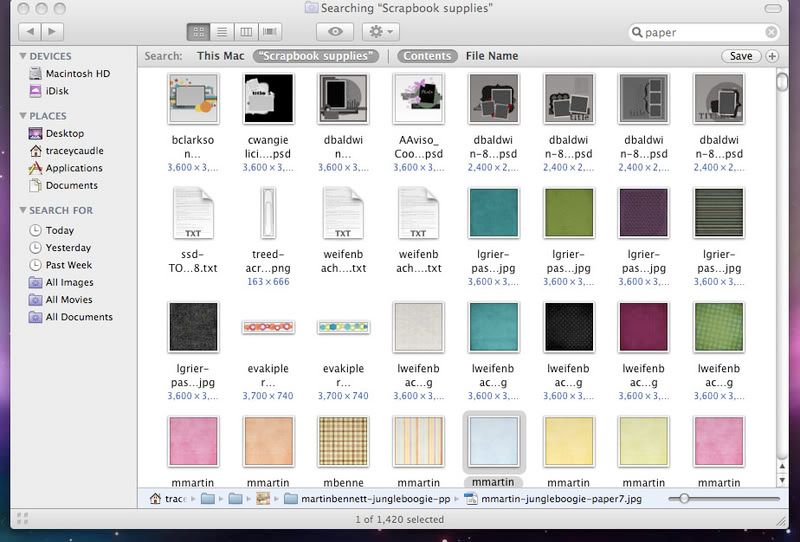
I find this much easier, and sometimes, depending how the files are named, I may go in and add stuff, like blue, for blue paper and such. Of course, renaming files is just as time consuming, but, much cheaper, I have found that most of the files, especially the elements, don't need renaming. I may have to add color names to paper files, but that just makes it easier to filter by color.
I just thought I would share my way of finding supplies. I used ACDSEE when I was using a PC. I liked it, but I hated tagging, and most of the time, when I was done, I didn't like the way I had tagged, LOL!
I find this much easier, and sometimes, depending how the files are named, I may go in and add stuff, like blue, for blue paper and such. Of course, renaming files is just as time consuming, but, much cheaper,
I have found that most of the files, especially the elements, don't need renaming. I may have to add color names to paper files, but that just makes it easier to filter by color. I just thought I would share my way of finding supplies. I used ACDSEE when I was using a PC. I liked it, but I hated tagging, and most of the time, when I was done, I didn't like the way I had tagged, LOL!
OH MY GAWWWWSH!! Genius!! Seriously!
ETA: I love that you can enlarge the pics too... i get so frustrated trying to look at the tiny pics!! SWEET!
ETA: I love that you can enlarge the pics too... i get so frustrated trying to look at the tiny pics!! SWEET!
There is a much cheaper and better way to find your files if you use a MAC. I always use spotlight, then I don't have to waste hours tagging. I am not sure how designers name there files elsewhere, since I really don't buy much anywhere else, but with they way the SSD designers name their files, all I need to do is type in spotlight what i am looking for. For example, It I want to look at all the paper I have, I just open up Finder, open up my scrapbook supplies folder and then I just search for paper.
I find this much easier, and sometimes, depending how the files are named, I may go in and add stuff, like blue, for blue paper and such. Of course, renaming files is just as time consuming, but, much cheaper,
I just thought I would share my way of finding supplies. I used ACDSEE when I was using a PC. I liked it, but I hated tagging, and most of the time, when I was done, I didn't like the way I had tagged, LOL!
yea you know i'm way too lazy to tag too.. i sometimes use finder or search and i do have a setup right now that i like - i use the program picture arena. Its no longer being updated so i don't know if its still available but in there I keep folders of my fav. designers (so its basically just alot of ssd) but anyways I realy like the way that program handles pngs and its fun to view them. lol