Hybrid Card Making Advice

littlekiwi

Active member
Can I ask some advice - I participate in a paper scrapbooking forum too but do digital & this weekend they have been doing a card crop, the organizer suggested I do some digital cards or hybrid cards so I gave doing a 6x4 card front a go & really struggled with it and ended up giving up - Do you have any hints; tips or tricks to particularly make hybrid cards but digital fronts would be fine too

I have Canon Matte Photo Paper, Kaisercraft Card Blanks, access to my moms bling & ribbon & flower stash as required.
 
I haven't made very many cards, but the ones that I've done have turned out pretty good, I think...

I make a template (8-1/2 x 11) in PS for my card (front and back), then design the card the same way I would a digital scrapbook page. Once I have it looking the way I like, I drag anything that I want to cut out and paste on, off to a blank part of the paper. Then I print the whole thing on one sheet of Canon Matte photo paper, cut out & glue on the extra pieces, then see if it needs any extra "bling" and add.
 
I do the same as Kate. I open a new file in the size I'm making my card (mine is usually 4.25x5.5, yours would be 4x6). I design my card in layers and get everything looking the way I want it. Then I'll open up an 8.5x11 file and drag my layers into it. I fill it up as much as possible, then print it. Once it's dry, I just cut out all my layers and assemble the card as I did in Photoshop. I add some ribbon, a little bling or a button & I'm done!

Here are images if that helps...

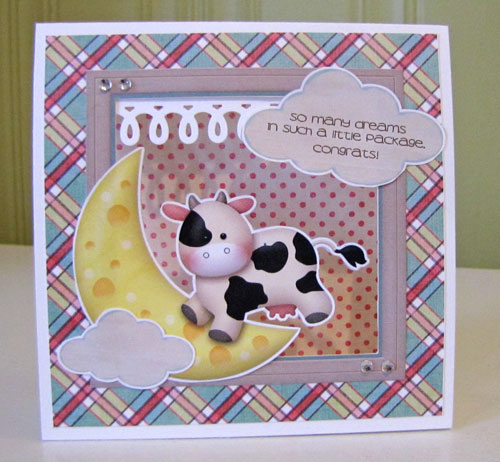
This is my card ready in layers in PSE:
baby-moo-card-5x5-1.jpg


And after I've dragged the layers into an 8.5x11 file:
Untitled-1.jpg


And the finished project:
baby-moo-card.jpg
 
Jae that card is PRECIOUS!!

I do what Jae does. I'm not sure how to help you with the actual card design though. I like to browse galleries and scraplift, or pull from magazines. I know that I LOVE the layer with mats, so I usually add a 1/4" mat to my file right from the start.
 
Jae, that card is adorable!

I do the same thing as Jae... I get my inspiration from scraplifts and the portfolio (especially the design prompts, working on #4 right now)
 
Same as all above... however, I don't do a lot of cards.

Also, digi layout templates make great starting point for card designs. Open a new file to the size of your card and drag in the parts of the template (like the photos and the surrounding paper clips and cluster placement)... and resize. You don't have to clip a photo (or I have used general photos like photos of flowers), you could clip paper or place a large element (like Jae's cow) in it's place. :)
 
I like to look for sketches for cards. There are some great card sketch sites. This is one of my favorites: http://2sketches4you.blogspot.com/

I don't have a color printer at home, so I always design my digital cards to print all the parts on 4x6 prints (the cheapest) at the photo place.

For primarily digital cards, I design the card in PSE in the size it will be. So for A2 sized card I use 1200x1575 pixels. That leaves a 1/4 inch border around the outside of the printed image when it is mounted to the A2 sized card. To print it at the photo place I bring the finished JPG image into PSE and resize the CANVAS to 4x6 (or 1200x1800 pixels). The cheapest price for photos at a photo house is on 4x6 prints. For these, I often leave then un adorned (which is great for mailing because they aren't chunky).

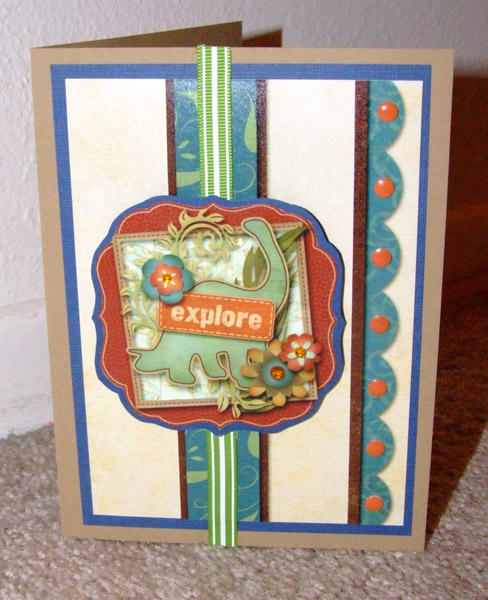
For other more 'hybrid' cards, I do as Jaedyn does. Print a variety of papers & elements on 4x6 prints and then cut it up. I add a little bling or ribbon and make sure one of the elements is popped up with 3 dimensional foam. Here's one of these I did for my portfolio:


This is in several parts. The mail cluster on the die-cut shape is one digital design I cut out. The background & blue strips are cut out from printed 4x6 papers. The scallop against the background is one digital design too because I wanted to get the shadow. Then I popped up the center medallion and added some sticky nail heads to the scallop. I really like the way it turned out!
 
Thanks so much for the love on my card ladies! :) I just loveit - I have it sitting on my desk here at home because it makes me smile when I see it!
 
Loving those card sketch blogs! I LOVE making hybrid cards but for some reason struggle with design. These will help tremendously!
 
Back
Top