How do you organize your digi-stash?

schock77

New member
Mine is a mess...I have all SSD kits in an SSD folder, but then they are just sitting there... organized alphabetically, so if I remember who made what, I'm in ok shape. But, I also feels it limits me (I usually scrap a kit a page anyway- I'm not a master mixer like Cindy or the babes- but maybe if I organized differently I would mix things up a bit).
It basically looks like this: Sweet shoppe designs> Fjardine_jolly folly (and inside that the papers and a folder for elements and alphas if included)

So, how do you set up your stash?
I have ACDSee but can't seem to tag entire folders (I'd love to have, say all my Christmas kits tagged as such)... I can't IMAGINE going through my entire stash and tagging each individual ribbon, etc. as I don't usually scrap that way, but I want to know what works for you.
 
I have 4 folders - Basics, CT, Designers, Templates

Inside Basics I have folders for basics. :D Alphas, Date Elements, Paint, etc. I don't split apart kits, but any element packs/alpha packs, go in there.

Designers is organized by designer except for SSD Collabs, those have their own folder. :)
 
Digital Stuff
- Designer Name
- Kit

So basically my "digital stuff" folder has an assload of designer folders. When I buy something, I just unzip it into the appropriate designer's folder.

Then I tag it in ACDSEE at the same time as I unzip it, or else it won't ever get done. lol
 
I redid my newest EHD, but I haven't copied the new system over yet to my other 2. That's my goal for the 1st week of January.

I'll post it here when I get home. It's basically folders for designers, but I have also broken out some template folders, alphas folders. I'm really liking putting all my SSD alpha's/template/certain elements in one place.
 
I have 4 folders - Basics, CT, Designers, Templates

Inside Basics I have folders for basics. :D Alphas, Date Elements, Paint, etc. I don't split apart kits, but any element packs/alpha packs, go in there.

Designers is organized by designer except for SSD Collabs, those have their own folder. :)

Thanks Sara- I think that's what I need to do...
 
I have an SSD Folder with categories...
valentines, everyday moments, beach, boy, girl, teen boy, teen girl..etc...
I tried organizing by designer but found it hard to lay my hands on a specific type kit quickly...and I am working on getting kits tagged but I am using Picassa for that task instead of ACDSee since Picassa is a free program.
This is how I do all the stores I purchase from.
 
Mine looks like this:
kits
  • A
  • B
  • C
  • ...
  • SSD
    • CLyle
    • Dmogstad
    • EKipler
In each designer folder are their kits in folders. I don't tag everything but I do tag the previews. I tag them as a preview, some main colours (great for colour challenges, ADSR, etc) and themes like Christmas, Valentines, Love, Craft, Cooking, etc. Handy is also, that if the kit has an Alpha in it, I tag the preview with alpha as well. So say, I want to find a green alpha, in the organize window I check the categories preview, green, alpha it will show me the previews of kits with the alpha in it or a stand alone alpha set.

Element sets, alphas and templates get their preview tagged as well. Simply the preview as preview and then alpha, dates, fasteners or whatever that is.

This works perfectly for me and I don't have to go through each and every paper or element. And because I don't split up the kits I know exactly from which designer it is.

I also have a CT folder for Heather, same hierarchie as the kits folder. In there I put with whatever kits I have to work with. As soon as I am done, I move the kit in ACDSee from the CT folder to the SSD - HRoselli folder.
 
Mine is
Scrap Stuff
*broken down to
--Designers I CT for
--The Basics
--full kits
--SSD
--unused

The Basics are broken down into
alphas
bits and pieces
date elements
fasteners
flowers
frames
labels
masks and misc.
paper packs
paper pieces (bc I collect Jacque Larsen's stuffs)
ribbons
splats
stitching
swirls
templates
word art

and then SSD is broken down into
alphas
date elements
fasteners
flowers
frames
full kits
masks and misc
papers
QA
scoops
stitching
"surprises"
templates
word art

all my CT folders are just everything all together


I obviously took lessons from Sara :p
 
Digital Scrapbooking
1 - Layouts
2 - SSD
~>1 - Collabs
~>2 - Alpha'
~>3 - Other
~>4 - QP's and albums
~>5 - Digital Stamps
~>6 - Templates
Then by designer. Within each designer folder it's broken down into a folder for kits, and a folder for everything else.
3 - Etc
~>Basic Elements
~>Basic Papers
~>Alphas
~>Brushes
~>Elements
~>Kits
~>Paper Packs
~>Photo and Page Overlays
~>Templates
~>Wordart
Then the rest of the main digi-folder is broken down by popular designers I have a lot of stuff for, along with folders for Lightroom Presets, and Store Collabs.
 
When I download I put all my files in folders of the stores name except my CT stuff which is in folders by team and month. Once inside that folder it is a mess. Nowadays, I just put everything in a folder dated when I purchased it. Everything is shown in Picasa and that is where the magic happens. I rename every folder which Kit Name, Papers, Alpha, etc. and then Designers name. I have a few things tagged. Mostly I have my SM stuff tagged for CT purposes, SSD is almost all tagged, Christmas and winter and some of the other seasons, and some other stores. In a perfect world I will have the store, and theme eventually tagged. Perhaps a project 2010?

Mostly I just scroll through and pick what I like or search by Designer name or store and find what I like!
 
i have mine setup with the following folders...well there are actually more but i just listed the main ones...

i bought acdsee last night and i'm hoping it's going to help me get more organized and actually see what i have...

ct
kits to use
alpha
kits
elements (i have a bunch of subfolders in my elements folders)
-stitching
-date stuff
-wordart
-doodles
-ect
templates
fonts
 
Try tagging all your previews. It's nice to just run through the previews and that usually jogs my memory as to the kit that I want to use. My scrap files are organized by

scrap supplies
-designer name
---kit name

EXCEPT SSD since that is where I really scrap from. So that is

scrap supplies
--_SSD (I use an underscore as the first character so it will be first in my list)
----designer name
------kit name
 
Hey Steph,
I have mine broken down by topics.
Documents/My Digital Scrapbook/Halloween (and then kit folders within)
Documents/My Digital Scrapbook/Christmas
Documents/My Digital Scrapbook/Valentines-Love
Documents/My Digital Scrapbook/Winter

I have AcDsee too but I can't seem to figure it out. Once I had things pretty organized w/ it and my hard drive crashed. The program seems to create a lot of issues w/ my computer so I sort of gave up. Besides my system works for me.. Good luck and I'll be watching this thread too b/c I'd love to be as skilled w/ mixing and matching like Cindy too!
 
my project for new year's day is organizing my stash on my EHD. and backing them up.

i have everything in folders named for where i got them (ssd, digi chick, etc). but inside those folders? messy messy messy. so i'm reorganizing. i'll probably do them by designer. and then have the things alphabetical inside each designer's folder. for easy browsing.

i don't have any sort of program to organize them, so i just do it that way. it works for me. it used to be all nice and neat... but not anymore. now that i've bought stuff and not put it all in folders and everything. it's all just sort of floating around.
 
I tried to organize all of my stuff according to papers, elements, alphas, seasonal, etc. However, this didn't work for me. I like to see EVERYTHING that I have all at once.
So I keep my kits organized according to store and then designer. I also tag each kit according to designer and store.
 
I have a folder for each store, within that a folder for each designer and then its named by the kit/element pack name.
 
I have an SSD Folder with categories...
valentines, everyday moments, beach, boy, girl, teen boy, teen girl..etc...
I tried organizing by designer but found it hard to lay my hands on a specific type kit quickly...and I am working on getting kits tagged but I am using Picassa for that task instead of ACDSee since Picassa is a free program.
This is how I do all the stores I purchase from.

I love the idea of putting the SSD kits in categories. I currently have them by designer and I have so many kits...sorta addicted that I also have a hard time finding the kits I want when I need them...I think it's time to reorganize! Thanks for the suggestion!
 
I do it the one way most designers do not recommend. By product type. This way I iactually access all my stash (on my HD at least) for every LO and I find some interesting stuff.

The tedious part about it is having to lable the kits that have no lable (paper1; element2 etc), so I can give credit later.
 
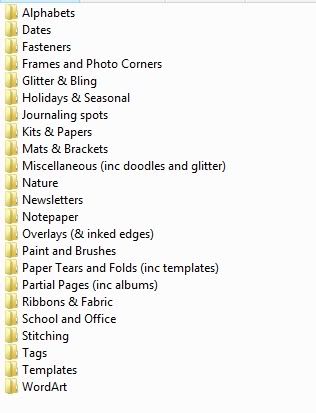
I'm anti-tagging, so here's what works for me. I have these folders:

Categories.jpg


I keep kits together, but pieces I think I'll use on other LOs get duplicated into the appropriate folder. Depending how many MB that is, sometimes I'll put a copy of the kit preview into the folders instead.

In order for me to really see and use my kits, I can't have sublevels. I need to be able to browse through them all quickly. So I keep them all in 1 big folder, and the folder for each kit is named Designer_Kit_Store. Here's an example of what it looks like.

Categories_Kits.jpg


I know some of you have even more than I do and this might not work for you, but I have about 300 kits in that folder and can browse that number easily. I have copies of seasonal/holiday kit previews in the Holidays and Seasonal folder, so I start there if I need a Halloween kit, snow kit, or whatever.
 
Back
Top