HELP PS issue

TwistdBeauty

Active member
never had this issue before
I have PS elements 22
I use the save for web resize then hit save and pick jpeg
used it yesterday no issue but today it will only same as images only no other options like jpeg or png
just using save after resizing my page is still too large to add to the gallery.
Any idea how to fix this issue
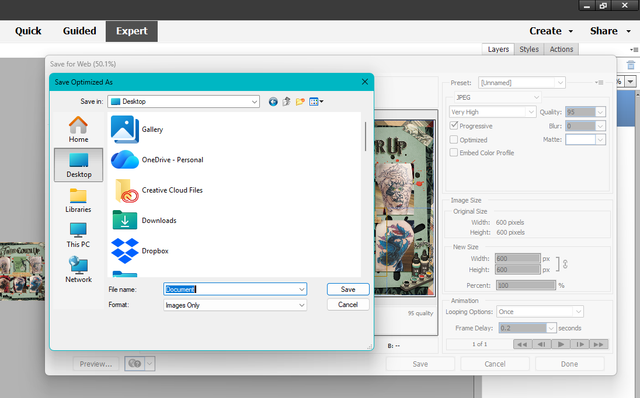
Screenshot-2025-12-03-091320.png


Thinking about getting elements 25 or 26( if its out yet)
 
Last edited:
No idea, sorry! My IT person is another scrapbooker I know from another site, so I hope someone here can help you! I would say maybe try updating your program or turn your computer off and back on!
 
when that happens I always try to just add the .jpg at the end of your file name and see if that works.
 
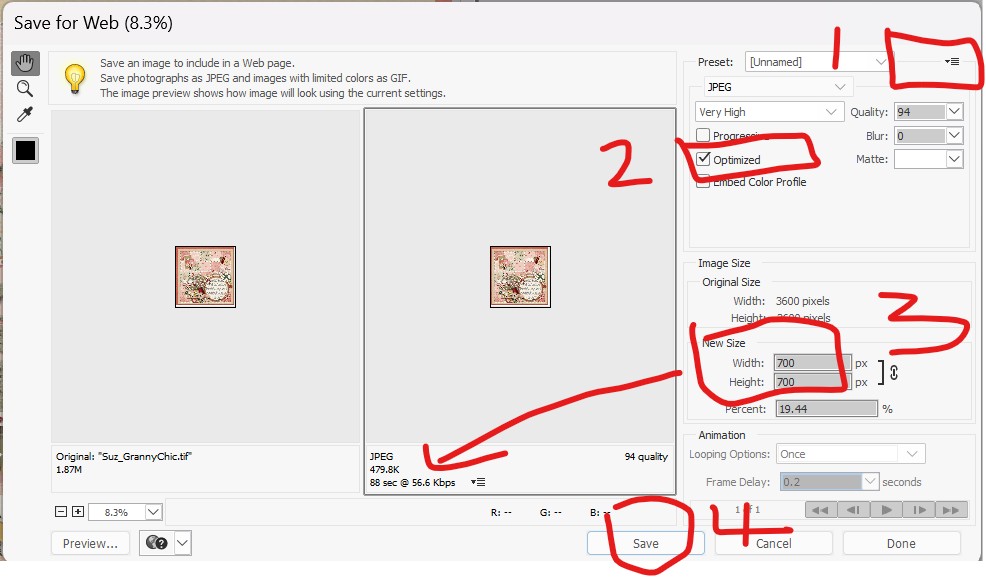
I use PSE22 and have an old action that I use for 700x700 which adds a sharpening effect at the end. However, without that, this is what I would do:

From inside PSE > File > Save for Web

  1. Set file size to below 500 for the gallery here (I set mine at 485)
  2. Make sure Optimised is ticked
  3. Change size of image to 700 x 700
  4. Save. Images only is the only option I get at this point too, but as long as I've followed the above steps that works fine.

Screenshot-2025-12-03-190159.jpg


I find saving this way does blur the image a little, so run the auto sharpen option in the enhance tab on the smaller file and save again.

If this is what you do and something isn't working, sorry I don't know what to suggest :(
 
Last edited:
I did try that and it still wont change and does images only and saves as a folder this my layout in pieces


I use PSE22 and have an old action that I use for 700x700 which adds a sharpening effect at the end. However, without that, this is what I would do:

From inside PSE > File > Save for Web

  1. Set file size to below 500 for the gallery here (I set mine at 485)
  2. Make sure Optimised is ticked
  3. Change size of image to 700 x 700
  4. Save. Images only is the only option I get at this point too, but as long as I've followed the above steps that works fine.

Screenshot-2025-12-03-190159.jpg


I find saving this way does blur the image a little, so run the auto sharpen option in the enhance tab on the smaller file and save again.

If this is what you do and something isn't working, sorry I don't know what to suggest :(
 
Back
Top