

I'm working on a Mac with the trial version of CS6. I was excited about the new Auto Save feature because I've had whole pages lost before because I failed to save as I went. I thought it would be nice to not have to worry about that anymore. So, last night, I unwillingly tested the feature and it DIDN'T WORK!  I started with a template, so when I got the photo in place, I did a 'save as' to create my own page (so the auto save wouldn't save over the template). So, close to being done with the page, it closed out unexpectedly but I wasn't worried...auto save to the rescue. Wrong!
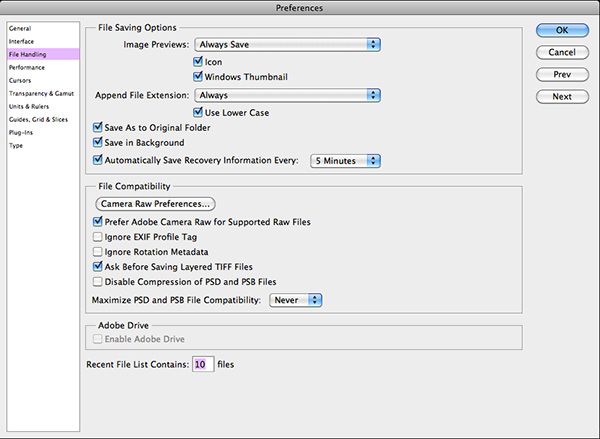
  When I pulled my page back up, it was back to the template with only my photo on it...from the point where I'd done the 'save as'. So, my question is, are my settings wrong? Any idea why it didn't work? Here is a screen shot of my 'file handling' preferences...
Any help would be greatly appreciated! Thanks!!
I started with a template, so when I got the photo in place, I did a 'save as' to create my own page (so the auto save wouldn't save over the template). So, close to being done with the page, it closed out unexpectedly but I wasn't worried...auto save to the rescue. Wrong! When I pulled my page back up, it was back to the template with only my photo on it...from the point where I'd done the 'save as'. So, my question is, are my settings wrong? Any idea why it didn't work? Here is a screen shot of my 'file handling' preferences...
Any help would be greatly appreciated! Thanks!!


