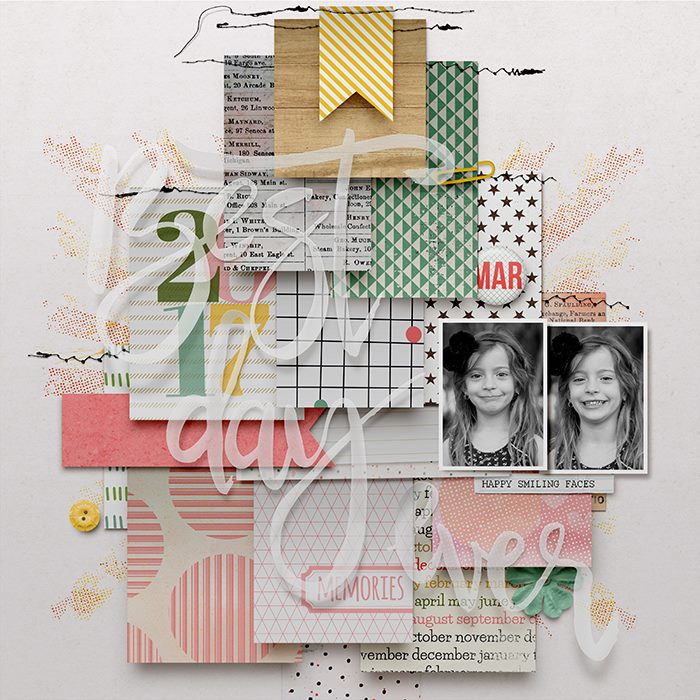
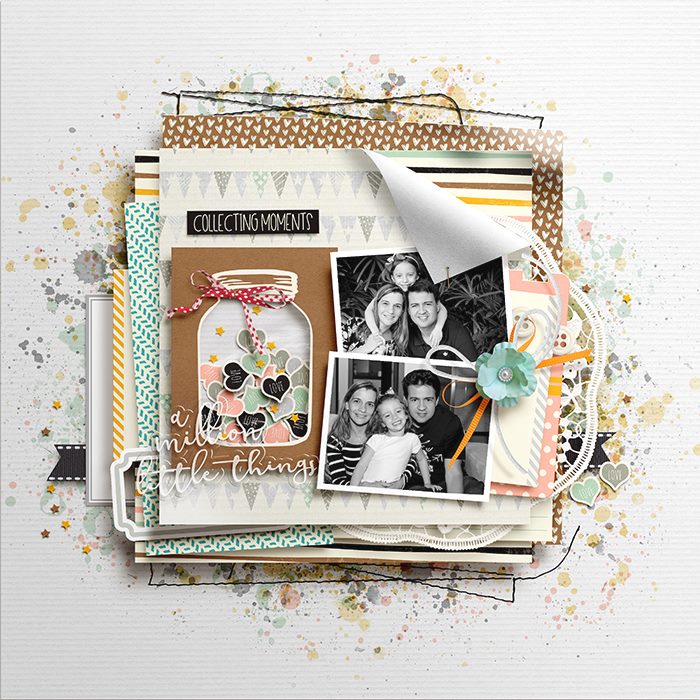
Before or After (Shadows)

Neverland Scraps

Active member
Yesterday I asked how you all pronounced "template" because I was watching a video from Scrapaneers and she said a word that got me wondering the correct pronunciation of that word. I was shocked at how so many people answered (thank you!).

After I finished watching that first video, I went to the second video on shadows. Okay if you know me, you know I've been trying to master (or work) on my shadows this year. I always try to learn something new or push boundaries when it comes to my layouts. I was curious to see what Video #2 said about shadows that I had to watch. It's a good video on shadowing and I recommend you watching it, especially if you are learning how to shadow or looking to expand your shadowing styles (she uses Photoshop).

While watching Video #2, I got wondering something else that I wanted to ask you all:

WHEN do you shadow? Do you do it ALL at the end? Do you do it when you place the paper/element?

Tell me a little bit about how/when you shadow.

If you do it at the end, does the page come to life?
 
Always as I go, no exceptions! I'm all about effectively using my time, so it's much more efficient to shadow as you go IMO. I guess if you were universally adding the same style, you could do it at once, but that's not my approach.
 
I shadow some elements as I go (especially flowers. I add a shadow and then duplicate them, so I only have to shadow once). If it's not something I plan on reusing, I usually save those shadows for the end. Sometimes, if I don't like how something is looking, I'll add shadows then, so see the overall end affect.
 
I shadow as I go and make changes at the end if I feel I need to as well like Tronesia
 
I do it both ways. It depends if I change or reposition or resize things.
But I don't see a difference of applying them at the end or as I go because I stop modifying them or adding them as I please.
 
Always at the end. I do a 2 layer shadow. (One layer is a very small shadow on the opposite side from the main shadow. It helps elements pop.) So after I've shadowed, moving things takes the extra step of selecting both layers. Since I move things around a lot as I scrap, it's more efficient for me to shadow last.

Sent from my SM-G965U using Tapatalk
 
Normally as I go. I do end up going back and changing things sometimes to make it all look cohesive.


Sent from my SM-G965U using Tapatalk
 
I shadow as I go. I want to see how it's going to look as I'm doing it. If I need to, I'll change things at then end.

Thanks for sharing the video!! This is an area I want to work on!
 
In the end! First I focus on element placement, then I focus on the shadows. I move layers around so the shadows may need to be changed anyway.
 
Always at the end. I do a 2 layer shadow. (One layer is a very small shadow on the opposite side from the main shadow. It helps elements pop.) So after I've shadowed, moving things takes the extra step of selecting both layers. Since I move things around a lot as I scrap, it's more efficient for me to shadow last.

Sent from my SM-G965U using Tapatalk

That's interesting. I do that on some things, but not all things. I might have to try this more to see how much more of a pop it will give, especially towards papers/photos/journal cards (you know those flat things)
 
For me, I shadow as I go along. When the layout is done, then I separate the layers and start warping, skewing and distorting them--that's when the page really comes to life! If a shadow is too dark, I change the opacity of it and just play with the settings until I like it. But you know I'm always working on my shadows and probably will the rest of my scrapping life! :D
 
For me, I shadow as I go along. When the layout is done, then I separate the layers and start warping, skewing and distorting them--that's when the page really comes to life! If a shadow is too dark, I change the opacity of it and just play with the settings until I like it. But you know I'm always working on my shadows and probably will the rest of my scrapping life! :D

This is how I do it too.
 
I really want to learn to warp shadows! That's one of the few reasons I have PS. I use PSE because every time I open PS I get frustrated :p
 
I really want to learn to warp shadows! That's one of the few reasons I have PS. I use PSE because every time I open PS I get frustrated :p

Do you have a warp tool on PSE? If so you could do a work around. I think I've seen a video about that before?

But if not, you should definitely learn warping with PS it's totally worth it
 
Do you have a warp tool on PSE? If so you could do a work around. I think I've seen a video about that before?

But if not, you should definitely learn warping with PS it's totally worth it

I've heard there is a work around for PSE, but shadows are not on separate layers in PSE like they are in PS. I think that's one of the biggest differences (at least as far as shadows are concerned).
 
Always at the end. I do a 2 layer shadow. (One layer is a very small shadow on the opposite side from the main shadow. It helps elements pop.) So after I've shadowed, moving things takes the extra step of selecting both layers. Since I move things around a lot as I scrap, it's more efficient for me to shadow last.

Sent from my SM-G965U using Tapatalk
I do a two-sided shadow on some layers too! I use shadow styles I made that use the universal global light angle on the top layer and one that goes the opposite direction on the bottom (lower opacity and shorter). It's mostly a one click process unless I want to change the opacity of the shadow because of the background color (but I have sets of shadows for light and dark backgrounds).

It's always interesting to hear how people approach certain techniques. Most of my pages have well over 100 layers and I don't want to have to touch every layer multiple times. I only customize some layers. Warping on layers that have complex edges doesn't always make a material difference, so I really only target things like ribbons, hardware and papers.
 
I'm embarrassed to say that I don't know what it means to warp a shadow. I use some shadows from Jenn Barrette. Maybe she has that built in?
 
I do a two-sided shadow on some layers too! I use shadow styles I made that use the universal global light angle on the top layer and one that goes the opposite direction on the bottom (lower opacity and shorter). It's mostly a one click process unless I want to change the opacity of the shadow because of the background color (but I have sets of shadows for light and dark backgrounds).

It's always interesting to hear how people approach certain techniques. Most of my pages have well over 100 layers and I don't want to have to touch every layer multiple times. I only customize some layers. Warping on layers that have complex edges doesn't always make a material difference, so I really only target things like ribbons, hardware and papers.

I have made my own set too. And just to let you know, I have learned lots of things out from your pages as well from Tronesia, Isa Marks and armygrl.:wub:

I remember I was "studying" the fact that you use different settings depending on the background color. And I came up with this one: https://www.sweetshoppecommunity.com/gallery/showphoto.php?photo=513238&title=-thesis-done-&cat=500 :o:o

Still learning though
 
I'm embarrassed to say that I don't know what it means to warp a shadow. I use some shadows from Jenn Barrette. Maybe she has that built in?

Warping shadows gives you a more realistic look.

The best example here, I believe, is Isa Marks. She knows how to give her layouts such a realistic illusion. (Some are a combo of hybrid and digital).

The threads, the photo, the yellow banner, the title itself. All shadows flowing through her page matching the lighting.


She has de audacity to give life to her pages just like this :crying:

Amazing skills.:wub:
 
I'm embarrassed to say that I don't know what it means to warp a shadow. I use some shadows from Jenn Barrette. Maybe she has that built in?

Warping a shadow is done when you put the shadow on it's own layer. Once it's on it's own layer, you use the warp found under Edit ---> Transform and then ---> warp. From there, you play with the settings, adjusting and moving the shadow layer to make it look realistic. After you set the shadow, you can erase, blur even add dodging/burning to the shadow layer to make it look more realistic.

It sounds time intensive, but it's really just a couple of button clicks and lots of fun playing around making your layout come to life!

^^the above is done in Photoshop. I use CS5^^
 
I MUST shadow as I go. I don't use Photoshop so I dont know the process. But I haveat least 5 to 7 steps just to add an element. So I don't have the patients to go back through each one , layer by layer, when I'm done.

Plus I can't see the page come together unless I do it as I go. If I'm doing a layout that's not coming together I will delete it after 20 minutes and do something else. I never get far if I don't shadow as I go for this reason.

* side note: I have been looking everywhere for tutorials on shadows and layouts that focus more on " this is what looks appealing and this looks gross" most are heavily focused on the "lets show Ashley all of the technical magic she's missing with out PS" Aspect. I hope that makes sense- my cognitive functions are failing me today.

** and after reading the thread I see more magic awesomenss I'm missing-shadow warping?!?! I have to move to a laptop or iOS.
 
Last edited:
I have made my own set too. And just to let you know, I have learned lots of things out from your pages as well from Tronesia, Isa Marks and armygrl.:wub:

I remember I was "studying" the fact that you use different settings depending on the background color. And I came up with this one: https://www.sweetshoppecommunity.com/gallery/showphoto.php?photo=513238&title=-thesis-done-&cat=500 :o:o

Still learning though
:wub::wub::wub::wub:

I definitely look at the execution of other peoples's pages and learn from them too!
 
I MUST shadow as I go. I don't use Photoshop so I dont know the process. But I haveat least 5 to 7 steps just to add an element. So I don't have the patients to go back through each one , layer by layer, when I'm done.

Plus I can't see the page come together unless I do it as I go. If I'm doing a layout that's not coming together I will delete it after 20 minutes and do something else. I never get far if I don't shadow as I go for this reason.

* side note: I have been looking everywhere for tutorials on shadows and layouts that focus more on " this is what looks appealing and this looks gross" most are heavily focused on the "lets show Ashley all of the technical magic she's missing with out PS" Aspect. I hope that makes sense- my cognitive functions are failing me today.

** and after reading the thread I see more magic awesomenss I'm missing-shadow warping?!?! I have to move to a laptop or iOS.
I think it's pretty amazing you create pages on a mobile device!
 
I think it's pretty amazing you create pages on a mobile device!

I know, right?!

Like I spend HOW much sitting in my car EVERY.SINGLE.DAY!! If I could scrap on my teeny-tiny phone, I'd be SO productive!! There are days I dream and wish I were like Ashley. But the reality is my eyesight is really poor and there's no way I could handle scrapping on my phone. Ashley has a super-power!!!! :wub:
 
I do it as I go but I sometimes mess on with things at the end if they don't look right. I couldn't imagine doing it at the end.
 
I always do the shadows work at the end. I feel like it's distracting me to do it as I go.
I really enjoy taking the time to place papers and elements and focus solely on composition and clustering and then when I'm happy with it all, I take the time to focus on shadowing. It's how my mind works, I guess ;)
 
I always do the shadows work at the end. I feel like it's distracting me to do it as I go.
I really enjoy taking the time to place papers and elements and focus solely on composition and clustering and then when I'm happy with it all, I take the time to focus on shadowing. It's how my mind works, I guess ;)

When you do the shadows, because you do them at the end, does your page come to life right before your eyes?? That’s how I imagine it anyways
 
I want to take classes for this in 2019 and work on mine. I currently use an action, but would love to be able to tweak and what not.
 
Back
Top