

My turn for some honest critiquing please.

LJSDesigns

Sweet Shoppe Designer
I've been trying to improve how my layouts look in the gallery, so I've read the sharpening tutorial here and elsewhere and gave it a try. Since I use PSP, I have to adapt all tutorial settings and play at bit until I get what I think is it. So here is my sharpened layout. Is it too sharp? Do I need to readjust my settings?
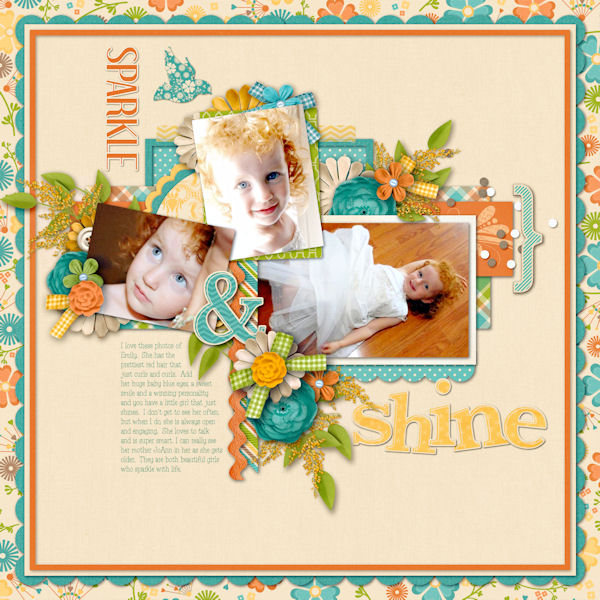
Sparkle_and_Shine.jpg


Let me thank you in advance for you help. I truly appreciate it. :wub:
 
I think it looks fantastic - the colors are beyond perfect for your photos! And the sharpness looks perfect to me :)

The only thing that I noticed -- the turquoise polka dotted scallop piece below the right photo - there's no shadow on it (not one I can notice). Just thought I'd mention that, lol :)
 
The only thing that I noticed -- the turquoise polka dotted scallop piece below the right photo - there's no shadow on it (not one I can notice). Just thought I'd mention that, lol :)

Dang it! I will go get that fixed. Thanks for noticing it. :)

Thanks for the critique everyone. I'm glad I didn't go overboard. As soon as I used the Unsharpen Mask I could see the difference. What a great little tool that is. Now I just want to go back and sharpen all of my layouts in the gallery. :)
 
Last edited:
Love it!

I have to say that I wish designers would require their CT members to sharpen their layouts before using them to showcase product in the stores. So many times I look through the layout examples and I find that every layout there is a little fuzzy. It makes me wonder whether the kit is like that or if its just layouts. Its kind of frustrating to not know for sure before buying!
 
I DO use the unsharp mask on my LO's that I do for my CT work and sometimes they still turn out fuzzy when uploaded to the store. Not sure why.

Love it!

I have to say that I wish designers would require their CT members to sharpen their layouts before using them to showcase product in the stores. So many times I look through the layout examples and I find that every layout there is a little fuzzy. It makes me wonder whether the kit is like that or if its just layouts. Its kind of frustrating to not know for sure before buying!
 
It's a store software issue more than it is a CT one - so even if CT's sharpen, it's the cart software that's at issue..not the designers or the CT members.
 
They only seem to be that way part of the time, that's why I didn't automatically equate it to software. I notice it randomly throughout different stores, not just here. It does seem like several layouts from the same kit will show up like that though when I do find it, that's why I always have trouble deciphering whether its the kit or the layouts. I've been known to sharpen individual pieces from a kit when I feel like they are too soft.
 
I completely agree. I think your layout looks awesome. Very crisp and clear. I don't think mine look that good. I use an unsharp mask too and I have always wondered why mine don't seem to look as good as some I see. I think I need to play with the settings or something.
 
I completely agree. I think your layout looks awesome. Very crisp and clear. I don't think mine look that good. I use an unsharp mask too and I have always wondered why mine don't seem to look as good as some I see. I think I need to play with the settings or something.

I think your gallery looks great. :)
 
Back
Top