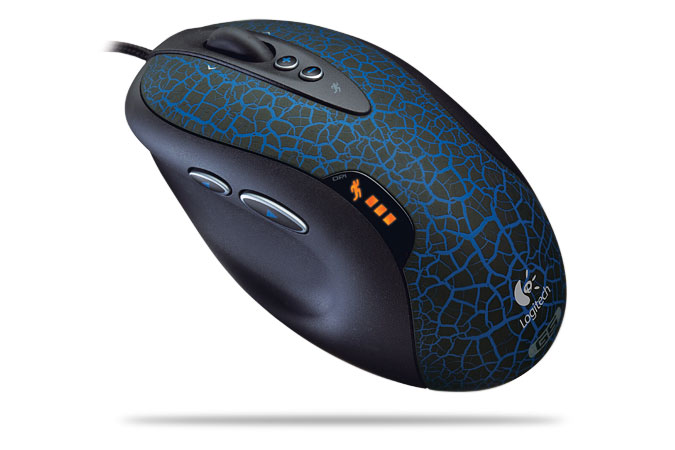
9-button mouse and Photoshop

krystalhartley

New member
So, my last mouse died, and I had my uber geek hubby pick up a 9-button mouse for me. Now, I know that this mouse will improve my World of Warcraft game (it will be sweet to not have to move a finger really to throw up PW:Shield or levitate...or maybe even my shadowfiend>shadowcrawl macro), but I'm thinking there must surely be a way to program the buttons for some basic Photoshop functions (like undo). I tried doing it through the shortcuts menu, but it doesn't seem to recognize the button clicks.

I'm wondering if anyone else has had success programming extra mouse buttons to do PS fuctions. I have CS3 if that matters. :)
 
*snort* I don't even use a mouse (I use my pen for everything... even browsing the web).

I didn't know they MADE 9 button ones. I'm trying to figure out where all the extra buttons are. lol
 
haha...well, I'm pen challenged. I used to amaze people with how quickly I could do stuff with just the finger pad on my laptop, but now even that seems like a chore.

actually, with the tablet/pen, my arm/wrist just get tired. So, I only use it when I have to...the mouse seems to work a billion times better for me with regards to fatigue and efficiency.
 
i have 2 extra buttons on the side of my mouse that i can easily click with my thumb. i've assigned CTRL+T to one (handy because it's great for scrapping in CS3 and it also opens a new tab in FF) and CTRL+C to the other (which i mostly use to C&P layout links on my CT boards :D). i don't really have any tips though, the programming for mine was pretty straightforward.

i'd loooove 9 buttons though. maybe that'll be my next purchase. hehe

(and don't listen to the crazy pen lady. :p pens make my hand cramp... not comfy).
 
glad you found it! :) you'll love having those extra buttons. sooo handy, not sure how i ever lived without them (and now i want more :D).
 
HAHAHAH - crazy pen ladies. I can't even imagine having to go back to a mouse, no matter how many buttons is has LOL My pen broke a few months ago and I went into shock trying to imagine how I was going to work w/o it! <shiver>

Hope you can figure it out, Krystal.
 
Holy crap! 9 buttons!!!! I'm so out of the loop of technology! lol- I didn't know they made them, either!

I use the touchpad on my laptop and occasionally my Wacom Tablet. I only use a mouse once in a blue moon (when I have to use DF's desktop computer!)
 
I had to goggle what a 9 button mouse looked like. I too use my pen exclusively and when I use my computer at school (work) I hate using a mouse.. it feels so unnatural LOL


guess that makes me a crazy pen lady with Libby and Darcy (I'm in GOOOD company)
 
I was intrigued so I had to google!!! This one says it has 9 buttons and it doesn't look much bigger then a "regular" mouse!!!

ux_a07072000ux0030_ux_g.jpg
 
HAHAHAH - crazy pen ladies. I can't even imagine having to go back to a mouse, no matter how many buttons is has LOL My pen broke a few months ago and I went into shock trying to imagine how I was going to work w/o it! <shiver>

Hope you can figure it out, Krystal.
Word...lol...I've broken 2 pens and finally just went and bought a new Bamboo because it's HARD to find replacement pens, lol...
 
In the meantime, though...before I got the Bamboo after my 2nd pen busted...I got a mouse because it was cheaper, lol (well and because I couldn't find a Bamboo ANYWHERE up here). Anyway, looking at it now, it's got like 5 buttons. I found it quite handy, honestly...it was pretty cool, and I wasn't sure when I got my Bamboo how I'd live without the extra buttons (I had it programmed to do back/forward with the side buttons).
 
This is the model I'm using


And yeah...cramping hands, too, when I'm doing really detailed stuff with the pen. It probably wouldn't get like that if I didn't "squeeze" so hard...but it just happens when I'm concetrating. Can't help myself.
 
Ive never seen a nine button mouse before but I use one with a scroll ball thingie...so much better on my hand then a regular mouse and I dont have to keep moving it just move the little ballie deal LOL Hope you enjoy your new mouse though. I see it is a Logitech which is the best mouse maker I think!!
 
Back
Top