

You are using an out of date browser. It may not display this or other websites correctly.
You should upgrade or use an alternative browser.
You should upgrade or use an alternative browser.
Organizing alphas?
- Thread starter AmyM
- Start date


ColleenSwerb
Brodo gettin her Swerb on
Well my first advice would be "get ACDSee", LOL!
How do you scrap? How do you look for your alphas? Break it down like that.
For instance a lot of times I'll want an alpha made of a certain material. So mine would organzied by type. Like cardboard, epoxy, acrylic.
How do you scrap? How do you look for your alphas? Break it down like that.
For instance a lot of times I'll want an alpha made of a certain material. So mine would organzied by type. Like cardboard, epoxy, acrylic.
nikkiARNGwife
New member
Here's some screenshots of my alpha folder..these are my subcategories...
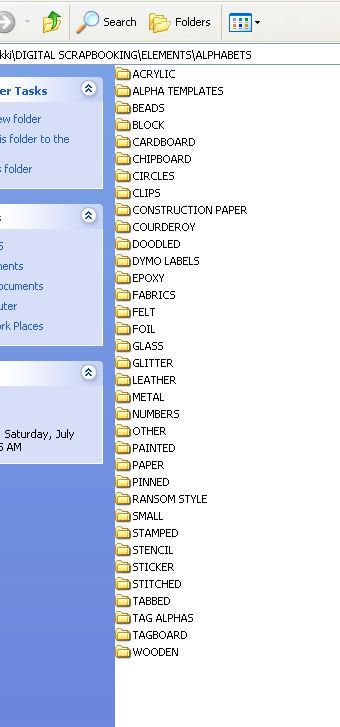
and then every folder I make a jpeg copy of the letter "a" so I'll have a larger thumbnail for reference. I also separate all numbers into their own folder so I'm not having to search for numbers through each folder when I need them..since all alpas don't come with numbers...
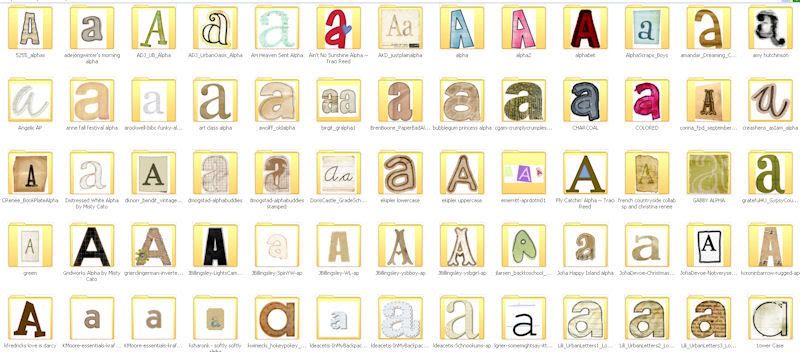
and then every folder I make a jpeg copy of the letter "a" so I'll have a larger thumbnail for reference. I also separate all numbers into their own folder so I'm not having to search for numbers through each folder when I need them..since all alpas don't come with numbers...

lizzyfizzy
New member
i'm soooo doing that 'a' thing nikki! your so smart.

LeeAndra
Sweet Shoppe SugarBabe
I use ACDSee and tag the 'a' of each alpha with all the information I want on it. 
I have rather specific cats and then more general ones depending i.e. a generic Fabric tag, but I also have more specific Felt and Corduroy tags since I have an awful lot of alphas that fall within those categories. I'm at work, so I can't make you a list of all of them.
I have rather specific cats and then more general ones depending i.e. a generic Fabric tag, but I also have more specific Felt and Corduroy tags since I have an awful lot of alphas that fall within those categories. I'm at work, so I can't make you a list of all of them.

MelissaL88
New member
Thanks, Nikki! That is one area where I haven't done a lot of organizing! I may need to setup some new tags in ACDSee.
ColleenSwerb
Brodo gettin her Swerb on
I prefer to make a contact sheet using ACDSee to see my alphas. Especially those pesky alphas that are all random and different fonts. Hate those.

scrapperjade
New member
I do like LA and tag my "a"s in ACDSee... not much help otherwise, lol!
ditzyscrap
New member
That makes WAY more sense than what I did...I tagged the entire alpha with "alpha", haha. So I would click on that category and um, yeah...what a mess!I use ACDSee and tag the 'a' of each alpha with all the information I want on it.
nikkiARNGwife
New member
What about alphas that come in multiple colors? Do you separate those into their own folders or do you just not worry about it?
If the entire alpha comes in different colors...like Misty and Dani are really great about giving us 2-3 colors of the same alpha..then yes I do separate them into different folders..but if it's just one alpha that's got all different colors I usually try and just make a note of that in the folder description
Yeah, and what about the alphas that have upper and lower case mixed in if you tag an "a" that's lowercase how do you know that the "H" is not uppercase?
The only thing I have done is given them the 'alpha' keyword in ACDSee and then I do a search on that keyword and they all come up and then I scroll thru them. Kinda not a very good process but it works for me.
The only thing I have done is given them the 'alpha' keyword in ACDSee and then I do a search on that keyword and they all come up and then I scroll thru them. Kinda not a very good process but it works for me.
ColleenSwerb
Brodo gettin her Swerb on
Yeah, and what about the alphas that have upper and lower case mixed in if you tag an "a" that's lowercase how do you know that the "H" is not uppercase?
The only thing I have done is given them the 'alpha' keyword in ACDSee and then I do a search on that keyword and they all come up and then I scroll thru them. Kinda not a very good process but it works for me.
Pam, that's why I make a contact sheet. I only tag the contact sheet and I keep it in the folder with the alpha. It's an option in ACDSee to create a contact sheet, it's super easy.

I have an alpha folder with a bunch of subfolders. First set is style of alpha - 2D, 3D plain or 3D embellished. 2D are stamps. Plain means the letter is it's shape only like stickers or chipboard, even glittered chipboard; embellished are round alphas, square alpha or alphas with stuff on them, like leaves or flowers.
Under each style I have subfolders for round, chipboard, fabric, sticker, paper, glass/acrylic, glitter, square and unusual. I have ACDSee tags set up the same way to tag kit alphas. I like to keep them with their kits.
Under each style I have subfolders for round, chipboard, fabric, sticker, paper, glass/acrylic, glitter, square and unusual. I have ACDSee tags set up the same way to tag kit alphas. I like to keep them with their kits.

AmyM
New member
Please tell me that 113 rows with 6 folders in each row does not equal 678. I did that math wrong didn't I.
This is the disaster I speak of. The rest of my stuff is obsessively organized ( I split the stuff in kits after I use them into mad categories), but this......yikes. Thanks for the suggestions ladies!


This is the disaster I speak of. The rest of my stuff is obsessively organized ( I split the stuff in kits after I use them into mad categories), but this......yikes. Thanks for the suggestions ladies!
LeeAndra
Sweet Shoppe SugarBabe
I hate alphas that are multi-colored and/or lowercase-uppercase mix, so this is usually not a problem for me, Pam. Nothing irks me more than spelling 'happy' or 'Einstein's Bagels' or 'Jared Leto' and the letters end up green + green + yellow + green + blue + blue + green. I know that's not much help.
If it is an alpha that comes in 3 or 4 complete different colored sets, I will tag the 'a' in each. I only use lowercase letters in my titles, so I never tag the equivalent uppercase 'a' in an alpha.
If it is an alpha that comes in 3 or 4 complete different colored sets, I will tag the 'a' in each. I only use lowercase letters in my titles, so I never tag the equivalent uppercase 'a' in an alpha.
Pam, that's why I make a contact sheet. I only tag the contact sheet and I keep it in the folder with the alpha. It's an option in ACDSee to create a contact sheet, it's super easy.
Cool, I'll look into that! Thanks Col!
ColleenSwerb
Brodo gettin her Swerb on
I hate alphas that are multi-colored and/or lowercase-uppercase mix, so this is usually not a problem for me, Pam. Nothing irks me more than spelling 'happy' or 'Einstein's Bagels' or 'Jared Leto' and the letters end up green + green + yellow + green + blue + blue + green. I know that's not much help.
Dude. Me too. HATE that. And it NEVER works out the way you want it to. One letter is always the wrong color.
scrapmonkey
New member
Yeah, I don't have ACDSee either and until this last month I just stuck them all in a big "Alpha" folder. When I had to transfer my files back onto my laptop after a repair I decided to sort them better. I have: chipboard, paper, grungy and crumpled, tabbed, metal and wood, fabric, epoxy and glass, doodled, and a few others plus miscellaneous. I usually want a certain style to go with my LO, so that's why I did that way. There are a few alphas I keep with the kits when they're still new and then when I move my new kits into their "permanent" home, I move the alpha to their proper alpha folder. Seems to work better than the previous method so far.
Amy - with no ACDSee, maybe go by Nikki's method, then the letter you find you most use in your title work? personally, I don't use "A" that often, so I sometimes tag with "E"...
ACDSee 'rs - categories I'm using came from somewhere on Digital Scrapping Info, and it's working for me. I have the materials (cardboard, chipboard, felt, etc.) in another section because I'm a supa-NERD and willingly admit it:

then you just tag the contact sheet or letter, whichever is your preference...
ACDSee 'rs - categories I'm using came from somewhere on Digital Scrapping Info, and it's working for me. I have the materials (cardboard, chipboard, felt, etc.) in another section because I'm a supa-NERD and willingly admit it:
then you just tag the contact sheet or letter, whichever is your preference...
mummytothree
New member
Ummm...can't be as bad as mine!!! I have 637 alpha :blink:
I use ACDESee to organize mine...thank the good lord above!!!
ETA: Well I just read all the response and I do see you are as bad as me!!!
Sorry girly no help from me!!!!
I use ACDESee to organize mine...thank the good lord above!!!
ETA: Well I just read all the response and I do see you are as bad as me!!!
Sorry girly no help from me!!!!
Last edited:
Please tell me that 113 rows with 6 folders in each row does not equal 678. I did that math wrong didn't I.
umm, no. Sorry, Amy. You do have 678 lovely alphas.
mummytothree
New member
Amy - with no ACDSee, maybe go by Nikki's method, then the letter you find you most use in your title work? personally, I don't use "A" that often, so I sometimes tag with "E"...
ACDSee 'rs - categories I'm using came from somewhere on Digital Scrapping Info, and it's working for me. I have the materials (cardboard, chipboard, felt, etc.) in another section because I'm a supa-NERD and willingly admit it:
then you just tag the contact sheet or letter, whichever is your preference...
I do have separate categories for number and symbols and brackets but I never thought to add Uppercase and Lower case...might have to do that!!!

iJenny
New member
I haven't read all the other replies, but here is how I do mine...
first, I make sure that the preview of the alpha is titled "folder" so that it shows up when I look at all the alpha folders. If there isn't a preview for the alpha, I make a contact sheet with the first few letters/numbers.
second, I name each alpha like this...
Designer Name ~ Kit or Alpha Name
So, if its La's alpha from her Mark It Up kit I would name it
Lauren Grier ~ MarkItUp
If its a single alpha (not associated with a kit) like Robin's Dressed Up Dots I would name it
Robin Carlton ~ DressedUpDotsAlpha
When I open my alpha folder, I see each alpha in its own folder and its organized alphabetically by designer. I like my system but its nothing fancy
first, I make sure that the preview of the alpha is titled "folder" so that it shows up when I look at all the alpha folders. If there isn't a preview for the alpha, I make a contact sheet with the first few letters/numbers.
second, I name each alpha like this...
Designer Name ~ Kit or Alpha Name
So, if its La's alpha from her Mark It Up kit I would name it
Lauren Grier ~ MarkItUp
If its a single alpha (not associated with a kit) like Robin's Dressed Up Dots I would name it
Robin Carlton ~ DressedUpDotsAlpha
When I open my alpha folder, I see each alpha in its own folder and its organized alphabetically by designer. I like my system but its nothing fancy
