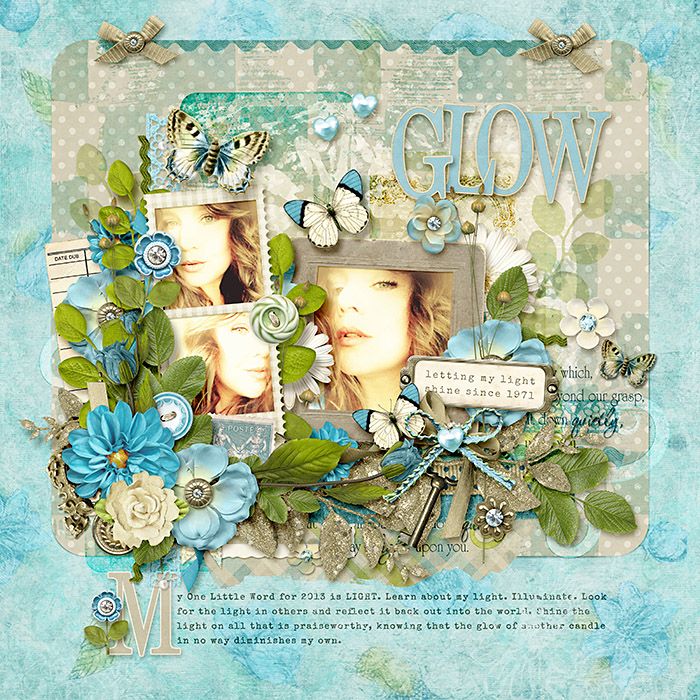
The ULTIMATE shadow question.

When do you add your shadows?


  • Total voters
    100
I shadow as I go. I can't "see" my layout without doing it that way. I often even tweak my shadows as I go. I don't really have a method - like I never do anything the same way every time.

I also can't "see" other peoples layouts without shadows either, if I see it while it's in progress....*coughTRISHcough*. ;)
 
I'm the same way. I need to see all the layers and how they are playing off each other as I move and place them. I tried the wait until the end method years ago, and it was a mess and a headache for me.

I shadow as I go. I can't "see" my layout without doing it that way. I often even tweak my shadows as I go. I don't really have a method - like I never do anything the same way every time.

I also can't "see" other peoples layouts without shadows either, if I see it while it's in progress....*coughTRISHcough*. ;)
 
I shadow as I go. I can't "see" my layout without doing it that way. I often even tweak my shadows as I go. I don't really have a method - like I never do anything the same way every time.

I also can't "see" other peoples layouts without shadows either, if I see it while it's in progress....*coughTRISHcough*. ;)

you know, it looks like most people are agreeing with you. never will I settle an argument by poll again.
:D
 
I need to figure out how to do the outer glow in PSP. I totally love the effect. Thanks for the information Krystal. :)
 
I shadow as I go. I can't "see" my layout without doing it that way. I often even tweak my shadows as I go. I don't really have a method - like I never do anything the same way every time.

yeah... this is a whole lot of me, as well.
 
I do both. I add basic shadows as I go, and then once I have everything finished, I go back and do custom adjustments to certain types of elements (flowers, ribbons/string, etc.).

This is me too, although I tend to do it in spurts - add papers, shadow, add elements, shadow, etc. Then at the end I go back and add any extra pop where I need it.
 
Always as I go. I think I get a better feel for the layout if it doesn't look flat as I'm working on it. I also make changes here and there at the very end.
 
I shadow at the end to save time. In order to not miss anything I start with the top layer and work my way down on the layers palette till I reach the bottom layer. Easy.

This, except I start from the bottom up. Yep, I DO miss layers occasionally which drives me batty, but about 80% of the time my shadows are on their own layer and I move things around a LOT.

LOL, I didn't realize I was in the minority.
 
This, except I start from the bottom up. Yep, I DO miss layers occasionally which drives me batty, but about 80% of the time my shadows are on their own layer and I move things around a LOT.

LOL, I didn't realize I was in the minority.

what they said, only I don't miss layers.... because I'm obsessive about my shadows. lol And I didn't realize I was so far in the minority either!
 
For those of us who are lazy...I think Krystal should sell her shadow styles in the store!

Okay. I took a few pieces from this layout and shared my shadow settings (drop and outer glow). I actually have my own shadow style set that includes both of these, so I recommend you go ahead and modify whichever styles you are using already and save them as a new style to speed things up. If you are curious about something on the layout that I didn't picture, just ask, and I'll just type them here.
 
I have to add shadows as I go along or I'll keep thinking my composition is off--I have a hard time visualizing things in my head. I'm pretty much the slowest scrapper EVER
 
I'm lazy like that. :)
I do separate layers for things...like my frames...I do a different shadow for the inside part of the frame that's directly over the photo, and I do a different one for the outside of the frame as it layers with everything else. My paper shadows often get special attention because I like to do a distortion wave on them.

I've been wanting to try this method Krystal! I saw a tutorial here a while back . . . is that what you're talking about?
 
Well...after seeing some of the responses, I decided to try shadowing as I go on the layout I just did and it made a huge difference in how things came together. I really could see the final product so much better as I was scrapping! I may just be a "shadow as you go" convert.
 
I always shadow as I go and then tweak at the end...I can't stand looking at a flat work in progress!!!!!
 
I need to figure out how to do the outer glow in PSP. I totally love the effect. Thanks for the information Krystal. :)


I haven't had a chance to try it yet but I think it looks like you would need to create two shadows, both on new layers, make the first/bottom one sort of a light yellow/beige/light tannish & the second/upper one your normal shadow color, and then run the yellow one through a gaussian blur filter so it softly extends out past the grey shadow, then play a bit with the blend modes.

I'm going to play around with it at lunch if possible. I like the effect.
 
Last edited:
I shadow mostly at the end... but will shadow the little clusters I do, sometimes to determine placement. I love the opposite shadow, and try to incorporate that on certain elements. I save my styles as I go or change them, so I have loads available on a click.


~Jenn
 
I'm the same way. I need to see all the layers and how they are playing off each other as I move and place them. I tried the wait until the end method years ago, and it was a mess and a headache for me.

Yep ,this is me too. The shaddows changes things so much and I need them to see if I like my placements of things right away.
 
Okay. I took a few pieces from this layout and shared my shadow settings (drop and outer glow). I actually have my own shadow style set that includes both of these, so I recommend you go ahead and modify whichever styles you are using already and save them as a new style to speed things up. If you are curious about something on the layout that I didn't picture, just ask, and I'll just type them here. You can see more of my clustery style pages here or just look at my previews in the shop to get a feel for my shadow style.

glowsettings_zps8d9d088a.jpg


And for comparison, the first layout uses both drop shadows and outer glow, and the second has all the outer glows turned off.

glowLR_zpsd8f966fb.jpg


glowLR-noglow_zps23abcd24.jpg

thanks a lot.. it's really helpful..
 
I shadow as I go, then tweak at the end. My eyes just cannot see a layout w/o depth.
I warp paper shadows and ribbons when I have time.
Also... I know this is crazy, but when I am working with a pre-shadowed template (tem-plet hahaha) I have to grab all the layers and apply a generic shadow style from my stash. This makes everything cohesive with my shadow preferences.

That being said, I like the use of outer glow, it really does make a difference. Thanks for the visuals Krystal. I will have to try that this weekend and possibly make new styles for myself.
 
Also... I know this is crazy, but when I am working with a pre-shadowed template (tem-plet hahaha) I have to grab all the layers and apply a generic shadow style from my stash. This makes everything cohesive with my shadow preferences.

Not crazy at all. I do the exact same thing. :)
 
I guess I am in the majority ...I shadow as I go and tweak at the end
I love the extra depth and clarity you get from using the outer glow..I think I need to play over the weekend:)
 
Back
Top