Happy Monday Sweet Shoppers!
I'm up bright and early mostly because I couldn't sleep. My perfectionist / people pleasing sides are making my brain work overtime! I literally woke up at 4am dreaming of our code breaking and everything getting whacked out haha It's been a LOOOONG couple of weeks for me behind the scenes working on this project! Believe it or not, I did most of it in secret! I didn't even bring the team in on it until I was in the home stretch. I really wanted this to be a fun "surprise" finale for our 20th birthday celebration for everyone, the Designers and Babes included!
To give you a little background, our previous forums and gallery were installed in 2007 and have LONG been out of any kind of support or updates from the developers. I wanted to upgrade them for our 10th anniversary redesign, but even then it wasn't possible. I am very much a "if it isn't broken, don't fix it" type of person, so we lived with it for literally years. It was safe and secure from the server standout, but it very much was a "it is what it is" situation. Our old forum and gallery were as good as they were gonna get.
Over the past few years, many many many people have asked for quality of life features like the ability to be able like posts and images and tag users, and for a really long time as much as I wanted to give you those features, they just weren't possible in our old forum and gallery. I also hesitated to do anything because our community is small, upgrades are costly, and from talking to our previous web host, it really sounded like if we moved to a new community platform, we would lose all of our old data because they weren't compatible which is not something I wanted to see. Losing 20 years of activity wasn't a good trade off for a like button in my eyes, you know?
Fast forward to moving to our new web host in 2024... He is wonderful, and in talking to him, I realized that maybe we were sleeping on what could be done with our "old" site. Life gets busy though and it wasn't until really reflecting on the past 20 years as I was getting ready for February's celebration that I decided I wanted to make this happen if we could. So, I started to research and spent an entire week building a copy of our forum in the XenForo demo and I fell in love with it and knew we had to make this a reality. That was about 3 weeks ago and now, here we are...
All of our forum activity and gallery data seems to have been imported successfully which is such a relief!
The Good
Natively XenForo is a modern, totally customizable community platform that is fully responsive (it looks beautiful on mobile devices) and its features are really built for making it easy for us to connect with each other. Reactions, mentions, replies, tagging, a million emojis, they're all here, and for me, it just feels awesome to use!
There are so many amazing features like the ability to drag and drop images right into your replies without having to host at a 3rd party site like Imgur. Yep! If you're playing along with our challenges, you can just click the image box in the post editor and drag your tracker right into the box that appears. If you upload a layout to the gallery, there is a box with BB code you can click to copy the code to insert the image right into your forum posts, or you can right click to grab the image URL and use the link menu in the image box to share your image the same way as always. There are actually a million ways to share images and attachments here in the forums and you have access to them all now!
And that's just the beginning, you can customize your profile with banners, delete and edit your own posts, we're still learning and finding all those features, so explore and let us know if you find anything fun!
The Trade-Offs
In the gallery especially, there are some compatibility issues and features that just didn't merge well. The images and usernames are all here and available for commenting and bookmarking, but things like your favorites lists weren't imported because XenForo doesn't use them. It uses a bookmark system where you can bookmark the threads and images you want to come back to again.
Because of the way our old gallery handled "multiple categories", you'll notice many duplicates in the gallery now that they've been migrated over. The duplicate images were always in the old gallery, it just handled the display of them differently. I am looking into how to clean this up from our end, but the more the gallery grows, the less of an issue it'll become, and I'm not sure if I can easily "fix" it. It definitely made me unhappy when I first saw the site after data migration was complete, but that's more a flaw of our old gallery than one of the new.
Our old gallery also automatically put your layouts in what it called "member galleries". Those came over in the import too, but they're a mess and almost like mini unorganized categories for each of you all dated the same which means they don't feel great to browse and are hard to search. I would not recommend you upload to those "albums" when you upload to the gallery.
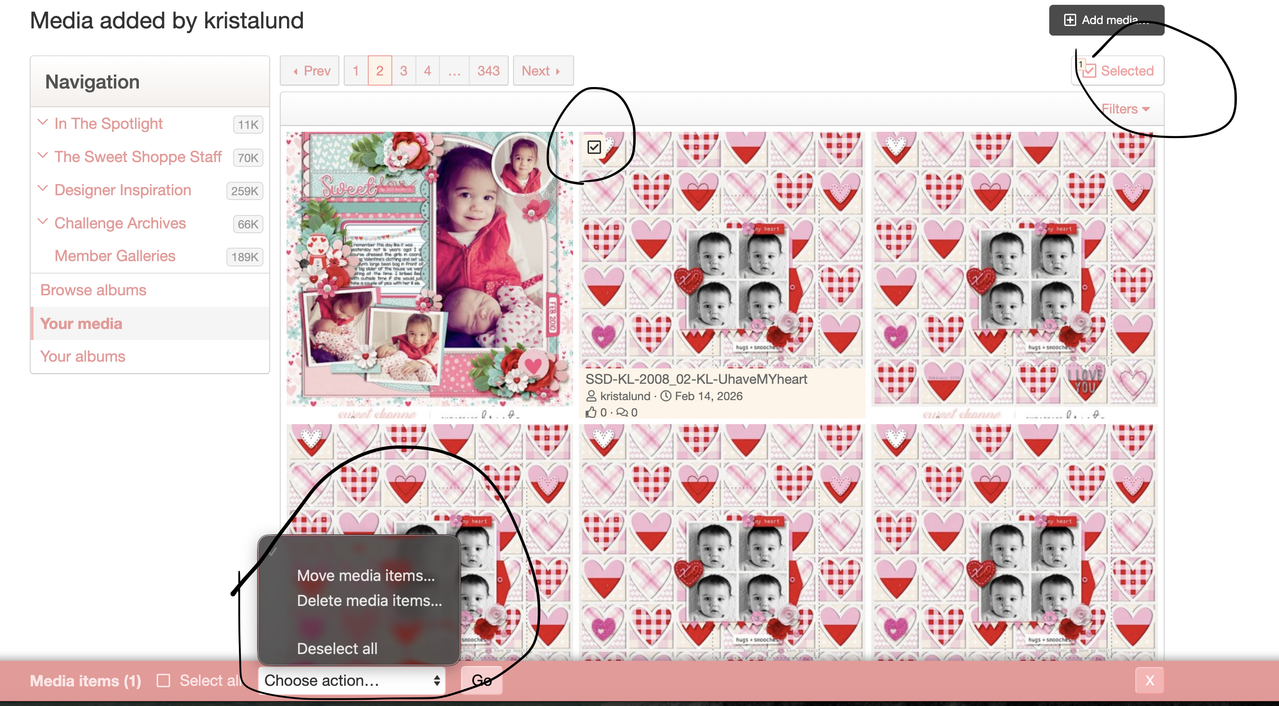
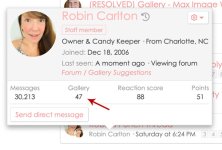
Instead, XenForo handles member media differently and much more simply. If you want to see a particular user's images or your own, I would highly recommend just hovering over their name in the forum or gallery and clicking the number above the gallery count. It'll take you right to all of their photos or yours
Speaking of the gallery, moving forward, we'd like to ask you to simply choose ONE category that best fits your layout and during the upload process, please use the boxes to share a brief description of your page, enter your credits (you can use the link button in the editor to add links from the shoppe now which is awesome) and MOST IMPORTANTLY, please tag your image with the designer(s) whose product you've used. Just start typing a designer name into the tag box and they'll pop up for you to use.

Since we can only upload to a single category, these tags will be key to helping us categorize layouts by designer so if you're ever looking for layouts featuring products from a specific designer or want to see all our SugarBabe layouts, you simply need to click the Tag on any image where you see it and it'll open up all of the layouts tagged with that designer's tag. You can also search by tag in the search bar too. Tagging is quick and easy and the more of us who use them the better this feature will grow to be. I'll post a separate discussion on tagging and categories today sometime to get your input, so look for that if you want to give feedback.
As far as sizing in the gallery, it is more generous now, so you shouldn't have to worry too much about getting those KB numbers just so. That said, we'd appreciate if you do keep our storage space in mind and continue to upload images that are 600 - 800px or so in size. If you're uploading a double-page spread, the thumbnail will crop it to the center, but the image itself opens beautifully, so I would recommend you upload those as-is at 1000x500px images. I am looking into this to see if we can get the thumbnail to sit all the way right or left on the index page so it's a little "prettier", but if it currently bothers you, you can also upload your right page and your left page one after the other so they sit side by side on the gallery index page.
The Work In Progress
There are definitely some things that I am still tweaking on my end, so your patience is really appreciated I would consider this space a work in progress, and still have quite a few things on my to-do list.
For example, searching in the forums is great, but in the gallery it is really REALLY strange. I already have a note off to the guy who did our migration to see if there is a problem with the data migration or something. It could just be an issue of needing to rebuild search caches, but I am currently looking into this.
We've never had a dark mode here at SSD and the current color palette is almost identical to our previous forums, but I saw the request in another thread, and like I said, our new community is incredibly customizable now, so I'll put working on a less bright theme on my to-do list.
Speaking of themes, under preferences, there's already a second skin option for the gallery that displays the images slightly differently on the gallery index page. Take a peek and choose the view you prefer. I will continue to customize and tweak these aspects until I'm happy with them and will keep you updated.
I'm sure there are other things that need to be addressed/shared, but this post is already INCREDIBLY long, so I'll wrap it up by saying this... We so freakin' glad you're here on this journey of discovery with us! I am definitely not an expert and am poking and prodding and discovering new things each day, and I think that's part of the fun. It was a mad dash to get here and then even more urgent to bring the site back online as quickly as possible, so there is still some fine tuning and polishing to do.
Feel free use this thread to ask questions, make requests, point out oddities you think I should look into or share your discoveries and helpful tips with others. All of us appreciate that community spirit and willingness to help each other out more than you know
Thanks for reading my wall of text and most importantly, welcome home.
Robin
I'm up bright and early mostly because I couldn't sleep. My perfectionist / people pleasing sides are making my brain work overtime! I literally woke up at 4am dreaming of our code breaking and everything getting whacked out haha
It's been a LOOOONG couple of weeks for me behind the scenes working on this project! Believe it or not, I did most of it in secret! I didn't even bring the team in on it until I was in the home stretch. I really wanted this to be a fun "surprise" finale for our 20th birthday celebration for everyone, the Designers and Babes included!To give you a little background, our previous forums and gallery were installed in 2007 and have LONG been out of any kind of support or updates from the developers. I wanted to upgrade them for our 10th anniversary redesign, but even then it wasn't possible. I am very much a "if it isn't broken, don't fix it" type of person, so we lived with it for literally years. It was safe and secure from the server standout, but it very much was a "it is what it is" situation. Our old forum and gallery were as good as they were gonna get.
Over the past few years, many many many people have asked for quality of life features like the ability to be able like posts and images and tag users, and for a really long time as much as I wanted to give you those features, they just weren't possible in our old forum and gallery. I also hesitated to do anything because our community is small, upgrades are costly, and from talking to our previous web host, it really sounded like if we moved to a new community platform, we would lose all of our old data because they weren't compatible which is not something I wanted to see. Losing 20 years of activity wasn't a good trade off for a like button in my eyes, you know?
Fast forward to moving to our new web host in 2024... He is wonderful, and in talking to him, I realized that maybe we were sleeping on what could be done with our "old" site. Life gets busy though and it wasn't until really reflecting on the past 20 years as I was getting ready for February's celebration that I decided I wanted to make this happen if we could. So, I started to research and spent an entire week building a copy of our forum in the XenForo demo and I fell in love with it and knew we had to make this a reality. That was about 3 weeks ago and now, here we are...
All of our forum activity and gallery data seems to have been imported successfully which is such a relief!
The Good
Natively XenForo is a modern, totally customizable community platform that is fully responsive (it looks beautiful on mobile devices) and its features are really built for making it easy for us to connect with each other. Reactions, mentions, replies, tagging, a million emojis, they're all here, and for me, it just feels awesome to use!
There are so many amazing features like the ability to drag and drop images right into your replies without having to host at a 3rd party site like Imgur. Yep! If you're playing along with our challenges, you can just click the image box in the post editor and drag your tracker right into the box that appears. If you upload a layout to the gallery, there is a box with BB code you can click to copy the code to insert the image right into your forum posts, or you can right click to grab the image URL and use the link menu in the image box to share your image the same way as always. There are actually a million ways to share images and attachments here in the forums and you have access to them all now!
And that's just the beginning, you can customize your profile with banners, delete and edit your own posts, we're still learning and finding all those features, so explore and let us know if you find anything fun!
The Trade-Offs
In the gallery especially, there are some compatibility issues and features that just didn't merge well. The images and usernames are all here and available for commenting and bookmarking, but things like your favorites lists weren't imported because XenForo doesn't use them. It uses a bookmark system where you can bookmark the threads and images you want to come back to again.
Because of the way our old gallery handled "multiple categories", you'll notice many duplicates in the gallery now that they've been migrated over. The duplicate images were always in the old gallery, it just handled the display of them differently. I am looking into how to clean this up from our end, but the more the gallery grows, the less of an issue it'll become, and I'm not sure if I can easily "fix" it. It definitely made me unhappy when I first saw the site after data migration was complete, but that's more a flaw of our old gallery than one of the new.
Our old gallery also automatically put your layouts in what it called "member galleries". Those came over in the import too, but they're a mess and almost like mini unorganized categories for each of you all dated the same which means they don't feel great to browse and are hard to search. I would not recommend you upload to those "albums" when you upload to the gallery.
Instead, XenForo handles member media differently and much more simply. If you want to see a particular user's images or your own, I would highly recommend just hovering over their name in the forum or gallery and clicking the number above the gallery count. It'll take you right to all of their photos or yours
Speaking of the gallery, moving forward, we'd like to ask you to simply choose ONE category that best fits your layout and during the upload process, please use the boxes to share a brief description of your page, enter your credits (you can use the link button in the editor to add links from the shoppe now which is awesome) and MOST IMPORTANTLY, please tag your image with the designer(s) whose product you've used. Just start typing a designer name into the tag box and they'll pop up for you to use.
Since we can only upload to a single category, these tags will be key to helping us categorize layouts by designer so if you're ever looking for layouts featuring products from a specific designer or want to see all our SugarBabe layouts, you simply need to click the Tag on any image where you see it and it'll open up all of the layouts tagged with that designer's tag. You can also search by tag in the search bar too. Tagging is quick and easy and the more of us who use them the better this feature will grow to be. I'll post a separate discussion on tagging and categories today sometime to get your input, so look for that if you want to give feedback.
As far as sizing in the gallery, it is more generous now, so you shouldn't have to worry too much about getting those KB numbers just so. That said, we'd appreciate if you do keep our storage space in mind and continue to upload images that are 600 - 800px or so in size. If you're uploading a double-page spread, the thumbnail will crop it to the center, but the image itself opens beautifully, so I would recommend you upload those as-is at 1000x500px images. I am looking into this to see if we can get the thumbnail to sit all the way right or left on the index page so it's a little "prettier", but if it currently bothers you, you can also upload your right page and your left page one after the other so they sit side by side on the gallery index page.
The Work In Progress
There are definitely some things that I am still tweaking on my end, so your patience is really appreciated
I would consider this space a work in progress, and still have quite a few things on my to-do list.For example, searching in the forums is great, but in the gallery it is really REALLY strange. I already have a note off to the guy who did our migration to see if there is a problem with the data migration or something. It could just be an issue of needing to rebuild search caches, but I am currently looking into this.
We've never had a dark mode here at SSD and the current color palette is almost identical to our previous forums, but I saw the request in another thread, and like I said, our new community is incredibly customizable now, so I'll put working on a less bright theme on my to-do list.
Speaking of themes, under preferences, there's already a second skin option for the gallery that displays the images slightly differently on the gallery index page. Take a peek and choose the view you prefer. I will continue to customize and tweak these aspects until I'm happy with them and will keep you updated.
I'm sure there are other things that need to be addressed/shared, but this post is already INCREDIBLY long, so I'll wrap it up by saying this... We so freakin' glad you're here on this journey of discovery with us! I am definitely not an expert and am poking and prodding and discovering new things each day, and I think that's part of the fun. It was a mad dash to get here and then even more urgent to bring the site back online as quickly as possible, so there is still some fine tuning and polishing to do.
Feel free use this thread to ask questions, make requests, point out oddities you think I should look into or share your discoveries and helpful tips with others. All of us appreciate that community spirit and willingness to help each other out more than you know
Thanks for reading my wall of text and most importantly, welcome home.
Robin


 Thank you Robin!