


PictureMom
Member
I have a new computer and it's a MAC..when I open photoshop to view file folders the images of elements and papers are so tiny compared to windows, I can't make them larger. How do you see your images to scrapbook with...

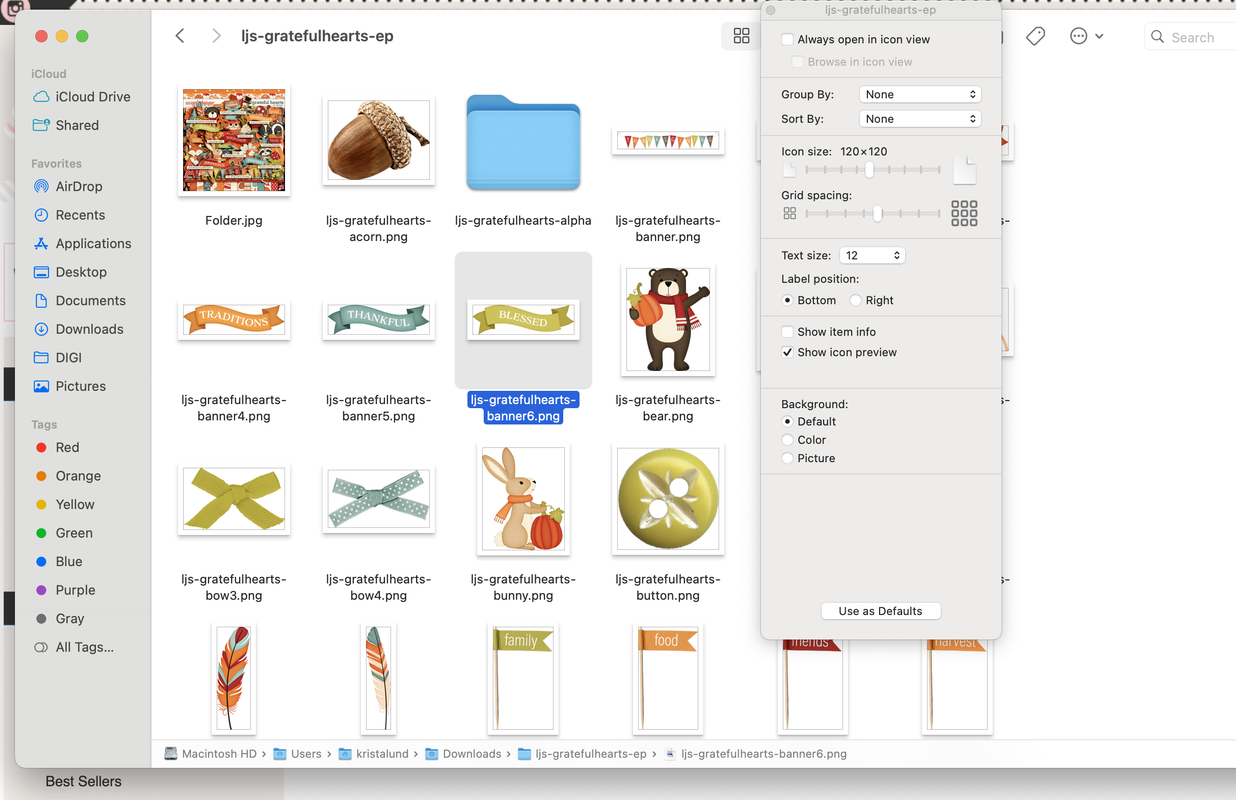


I had this this same issue when I switched over and it's the best that you can get it for now. 4 icons, view in cover flow use your dropdown to change the view... this works in Photoshop when selecting files to look at you will have to select each one individually but I do have an older laptop, hth.


if you want to see the elements or papers in a bigger size while working in Photoshop, just click on the one you want and press the spacebar. It’ll instantly enlarge the image! To go back to the original size, just press the spacebar again, and it’ll shrink back
https://www.youtube.com/watch?v=r2xtOcJOy1s
Hope that helps!
cool, right? :w00t:Shut up! No way!!!!

if you want to see the elements or papers in a bigger size while working in Photoshop, just click on the one you want and press the spacebar. It’ll instantly enlarge the image! To go back to the original size, just press the spacebar again, and it’ll shrink back
https://www.youtube.com/watch?v=r2xtOcJOy1s
Hope that helps!

if you want to see the elements or papers in a bigger size while working in Photoshop, just click on the one you want and press the spacebar. It’ll instantly enlarge the image! To go back to the original size, just press the spacebar again, and it’ll shrink back
https://www.youtube.com/watch?v=r2xtOcJOy1s
Hope that helps!
