Top Tutorial Needed/Wanted?

Top Tutorial You Want to See

  • Clusters & Shadows

    Votes: 13 56.5%
  • Title Work and/or Alphas

    Votes: 4 17.4%
  • Mixed Media

    Votes: 2 8.7%
  • Themed or Realistic Elements

    Votes: 0 0.0%
  • Journal Cards (non-pocket)

    Votes: 2 8.7%
  • One of the Elements Covered Already on Blog (tell me which one below)

    Votes: 0 0.0%
  • Something totally Different (explain below)

    Votes: 2 8.7%

  • Total voters
    23
  • Poll closed .

Kiana

Well-known member
Okay so you know how the amazing Angie was asking about what elements you need help with? (if you missed it, read THIS post)

Well, as Angie and I gather ideas and wrap our minds around working on tutorials....I was wondering if there's a TOP needed or wanted tutorial that we should try to tackle first?

I'm going to have some free time during break and I might get the itch to record my process so if there's something I can focus on working into a tutorial I was wondering what you all wanted to see.

You are welcome to leave comments to more. But I created a poll from Angie's post to narrow down a few ideas I saw there.
 
I love all of those suggestions but one I’d be keen on though not sure that it’s a tutorial as such but something about embracing different styles that aren’t your own (I’m thinking particularly for challenges mainly). I know I admire so many different styles but have a hard time trying them out myself.
 
Using themed/realistic elements and/or journal cards in clusters. Placement of these items is what I struggle with.

For me most tutorials that are geared towards how to do it in the various PS programs don't do me any good since I don't use those programs.
 
I love the journal cards and struggle to use them...they look like I just plopped something on the page, so then I delete them from my layout...and I have a ton of them but I just don't use them.
 
I need some shadowing tutorials that also cover the “why”… how do I know where the light is coming from or which angle it’s supposed to be or why/how the button differs from the feather, lol. In the plainest, most easiest-to-understand possible explanation. I remember struggling with this is middle school art class decades ago, haha.
 
I need some shadowing tutorials that also cover the “why”… how do I know where the light is coming from or which angle it’s supposed to be or why/how the button differs from the feather, lol. In the plainest, most easiest-to-understand possible explanation. I remember struggling with this is middle school art class decades ago, haha.

I still struggle with this when I am painting or sketching! :o
 
I love all of those suggestions but one I’d be keen on though not sure that it’s a tutorial as such but something about embracing different styles that aren’t your own (I’m thinking particularly for challenges mainly). I know I admire so many different styles but have a hard time trying them out myself.

I was that way with Art Journaling for the longest time. One day I just started adding brushwork and blending papers until I was happy with my background and went from there. Same with pocket pages. It all depends on my mood, and where I let it take me.

I tend to be a single photo, white space scrapper and that first heavily clustered page made my heart beat quick but I made it through and have at times clustered even more, and added more photos.

My best advice is to just let go, give it a try, and don't forget to add your personal touch. If you just try to copy a style you won't be happy with your final product, I can easily spot the pages where I have done that. Try a little of this and a little of that but keep your style in there as well, I think you will be pleased with the results.
 
I would love to have a series where a Sugarbabe walks us through the process of creating a layout. I always wonder what decisions were made to produce amazing layouts like Tammy or Kim B make. I wonder, "Why did you put that there? Why did you make your shadow like you did. etc"
 
I would love to have a series where a Sugarbabe walks us through the process of creating a layout. I always wonder what decisions were made to produce amazing layouts like Tammy or Kim B make. I wonder, "Why did you put that there? Why did you make your shadow like you did. etc"

I have plans for this one of my process .... :wub:
 
I struggle with Wiggins, avatars, etc and using off site app to post layouts. In other words the new technology
 
I struggle with Wiggins, avatars, etc and using off site app to post layouts. In other words the new technology

Off site app...like do you mean from your phone, Facebook, Instagram etc....?
I have never heard of Wiggins? Now I must look it up...lol
 
I'm interested in warped shadows, using paint/splatters/doodles, photo editing (not color, but easy tips- removing red eye, removing people, fixing blemishes. I used to have these in my notes, but I have missplaced them over all these years!)
 
Puppet warp!
Clusters and more realistic 3D shadowing are one of the reasons I finally became active here at SSD. NO ONE does clusters as well as the SSD artists!!
 
Last edited:
Could I add ribbons and strings, I love have it tuckered in clusters but sometime I just don't find how to used it beautifully!
I love all the other suggestion and can't wait to see new tutorials!:)
 
I really need to learn how to use text paths.... I always love getting templates that have sized/shaped text paths but I can never figure them out. I do know I can use them in paintshop pro, so I typically create my page there then open it in Photoshop to do the text, but I get frustrated easily when I can't get it to work. I'm sure using two programs is my issue, but if you can think of tips and tricks to put in a tutorial that would be wonderful!!!
 
I need some shadowing tutorials that also cover the “why”… how do I know where the light is coming from or which angle it’s supposed to be or why/how the button differs from the feather, lol. In the plainest, most easiest-to-understand possible explanation. I remember struggling with this is middle school art class decades ago, haha.

Ooohh I tried to answer this....did it help?!:confused:
 
I really need to learn how to use text paths.... I always love getting templates that have sized/shaped text paths but I can never figure them out. I do know I can use them in paintshop pro, so I typically create my page there then open it in Photoshop to do the text, but I get frustrated easily when I can't get it to work. I'm sure using two programs is my issue, but if you can think of tips and tricks to put in a tutorial that would be wonderful!!!

Hmm this is a good one
 
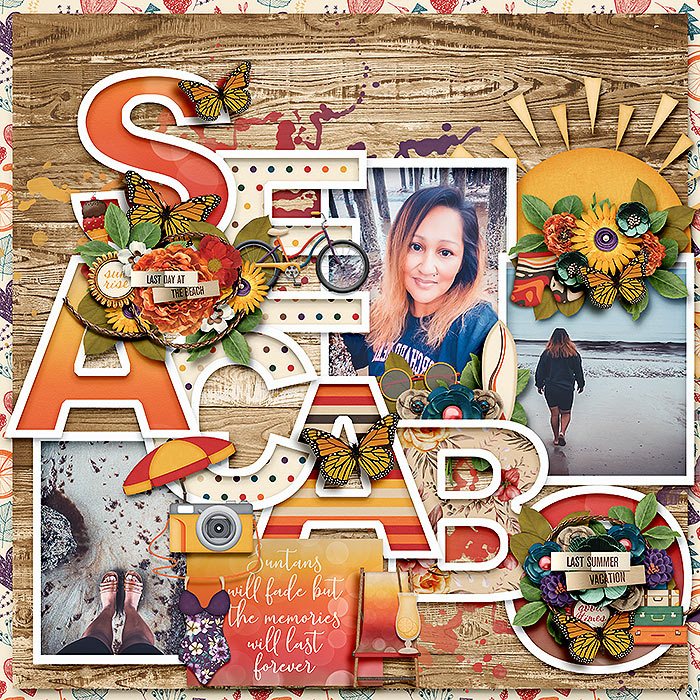
I would love Marnel (Mary M) to do a tutorial on how she creates her cutout letter titles. They are so lovely and she uses them a lot. I'm guessing she has developed a process for doing it that would be helpful for many of us! What fonts to use - does she use a stroke to create the cutout - what shadow settings? Examples below =)

20-sa-jcd-lastdaysofsummer.jpg

24-july-lbw_soakupthesun.jpg
 
I would love Marnel (Mary M) to do a tutorial on how she creates her cutout letter titles. They are so lovely and she uses them a lot. I'm guessing she has developed a process for doing it that would be helpful for many of us! What fonts to use - does she use a stroke to create the cutout - what shadow settings? Examples below =)

Oh I second that! Great idea!:)
 
Back
Top