

You are using an out of date browser. It may not display this or other websites correctly.
You should upgrade or use an alternative browser.
You should upgrade or use an alternative browser.
Forum & Gallery Guidelines - Please Read
- Thread starter Robin Carlton
- Start date

megscottstudio
Member
What is the current size for the layouts? I know they can't be any larger than 500kb but I am used to doing 600x600 and when I post in the forum, mine seems smaller than others in the same posts.

craftytam
Sweet Shoppe SugarBabe
What is the current size for the layouts? I know they can't be any larger than 500kb but I am used to doing 600x600 and when I post in the forum, mine seems smaller than others in the same posts.
They are 700x700

megscottstudio
Member
Thank you

ClaireG
New member
Hi - is it just me or is there an issue with the gallery description? I uploaded my layout this morning with a description and now it is not there  and when I go an edit my photo to add the description it saves, but still won't sure, am I doing something wrong? This is the second time this has happened to me.
and when I go an edit my photo to add the description it saves, but still won't sure, am I doing something wrong? This is the second time this has happened to me.
ClaireG
New member
Hi - is it just me or is there an issue with the gallery description? I uploaded my layout this morning with a description and now it is not there
AHA, I think my journaling might have been too long and I went over a character limit?
craftytam
Sweet Shoppe SugarBabe
Hi - is it just me or is there an issue with the gallery description? I uploaded my layout this morning with a description and now it is not there
The gallery will kick a description out if there are any "special characters" in it (for example - / ' "). Sometimes if you edit your description and take those out, it will accept the revised version (sometimes it won't). If it doesn't, you could add your description as a comment.
I hope this helps
ClaireG
New member
The gallery will kick a description out if there are any "special characters" in it (for example - / ' "). Sometimes if you edit your description and take those out, it will accept the revised version (sometimes it won't). If it doesn't, you could add your description as a comment.
I hope this helps
Thanks Tammy, I figured that out too late, how funny that in a year of posting it has only happened now!!
craftytam
Sweet Shoppe SugarBabe
Thanks Tammy, I figured that out too late, how funny that in a year of posting it has only happened now!!
You're welcome, Claire. It happens to all of us at one time or another
staceysmiley
New member
Edit Gallery Description
Hi there,
Is there a way to edit the description of my first layout that I just posted? I missed the URL for the kit I used and I want to go back and add it.
Thanks,
Stacey Smiley
Hi there,
Is there a way to edit the description of my first layout that I just posted? I missed the URL for the kit I used and I want to go back and add it.
Thanks,
Stacey Smiley

jacinda
Sweet Shoppe SugarBabe
Hi there,
Is there a way to edit the description of my first layout that I just posted? I missed the URL for the kit I used and I want to go back and add it.
Thanks,
Stacey Smiley
Hi Stacey
You could add it in the comment box below, or delete the image, and reupload new. See how that goes.
megscottstudio
Member
Quick question.. Can I post a layout from a kit that was created by Studio Flergs and Amber Shaw? I have a lot of the BIM kits and not a lot of the RTM ones and am making a special calendar for my family. I love the kits so much but I don't want to offend anyone.

Ponytails
Active member
Quick question.. Can I post a layout from a kit that was created by Studio Flergs and Amber Shaw? I have a lot of the BIM kits and not a lot of the RTM ones and am making a special calendar for my family. I love the kits so much but I don't want to offend anyone.
Yes, those ones are fine to use.

Leablahblah
Well-known member
Quick question.. Can I post a layout from a kit that was created by Studio Flergs and Amber Shaw? I have a lot of the BIM kits and not a lot of the RTM ones and am making a special calendar for my family. I love the kits so much but I don't want to offend anyone.
I also want to add there is a special gallery tribute to Amber so yes, please, post away!
https://www.sweetshoppecommunity.com/gallery/showgallery.php?cat=676


angiekey
Sweet Shoppe SugarBabe
Dense Newbie here. How do I link my gallery LO to the forum? I tried c/p didn't work - just got a link; tried Imgur - it works, but when you click on on LO, it clicks back to Imgur. Help, please.
Welcome, Cheryl - we are so very glad you're here!
There's a post in the forum that covers exactly this question. You'll find it right here: https://www.sweetshoppecommunity.com/forum/showthread.php?t=82756
If you have any more challenges with it after reading that thread, just post a question over there and we'll be happy to help.
Again, welcome to the Sweet Shoppe!

Pachimac
New member
Welcome, Cheryl - we are so very glad you're here!
There's a post in the forum that covers exactly this question. You'll find it right here: https://www.sweetshoppecommunity.com/forum/showthread.php?t=82756
If you have any more challenges with it after reading that thread, just post a question over there and we'll be happy to help.
Again, welcome to the Sweet Shoppe!
The video says private and you can't watch it.

Kiana
Well-known member
For linking your layout from the gallery you will have to do 2 steps.
Basically it's easier to use two tabs. One for your layout in the gallery and one for the post/thread.
1. Right click on the gallery layout and choose COPY IMAGE LOCATION
1a. Go to the thread, paste in between this code:
 so it would go between the opposing ] [ brackets with no spaces.
*** it will look like this
![url]](http://[url]www.myimagelocation.com[/url]) without the spaces
without the spaces
2. Copy the gallery URL in the address bar
2a. Highlight the full image text including the parts (
) , once highlighted use the "WORLD" icon and in the pop up paste the url link, click ok.
Your layout will be pasted and linked to the gallery.
Basically it's easier to use two tabs. One for your layout in the gallery and one for the post/thread.
1. Right click on the gallery layout and choose COPY IMAGE LOCATION
1a. Go to the thread, paste in between this code:
*** it will look like this
2. Copy the gallery URL in the address bar
2a. Highlight the full image text including the parts (
Your layout will be pasted and linked to the gallery.


mone
Active member
OMG my last LO here is from 2007. :blink:
where did the time fly???
After 15 years in which I only scrap very little, I've been fully involved again for a few weeks.
Now I know what I've been missing all these years.
there are a lot of pictures on my hard drive just waiting to be enchanted in Lo's.
I'm looking forward to lots of new inspiration, kits and challenges
where did the time fly???
After 15 years in which I only scrap very little, I've been fully involved again for a few weeks.
Now I know what I've been missing all these years.
there are a lot of pictures on my hard drive just waiting to be enchanted in Lo's.
I'm looking forward to lots of new inspiration, kits and challenges

Sherly
Sweet Shoppe SugarBabe Lead
I was wondering why the layout credits are no longer showing up in the gallery?
It is possible that you had some special characters in the credit that is messing up with the text when it is uploaded.

GrannyNKy
Member
It is possible that you had some special characters in the credit that is messing up with the text when it is uploaded.
Well it is not just credits on my layouts....no credits are showing up on any layouts in the gallery. Thus has been going on for me for some time now.... I have checked in my profile and can not see anything to change.
Any suggestions on what to do to correct this would be very much appreciated.

Hey Deborah!
I think you might have accidentally clicked to close the photo details window. Here's a screenshot of the location so you can check...
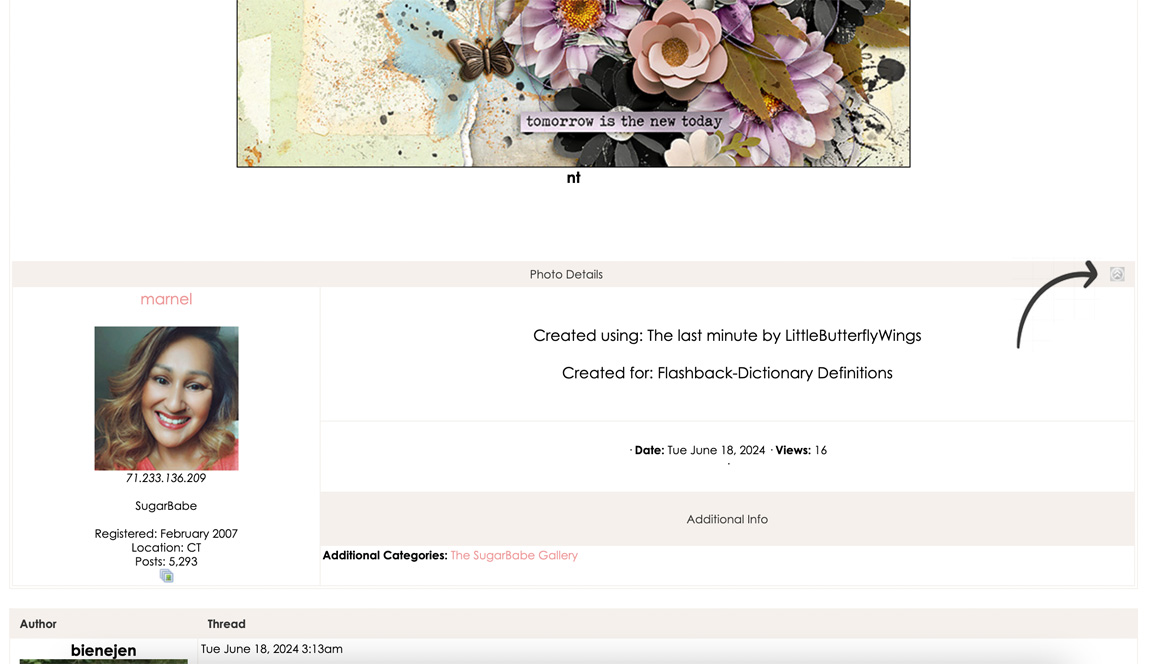
LMK if clicking that fixes the issue for you. I noticed when I hid the photo details on one layout, it hid them on all of them, so hopefully, this does the trick!
R
I think you might have accidentally clicked to close the photo details window. Here's a screenshot of the location so you can check...
LMK if clicking that fixes the issue for you. I noticed when I hid the photo details on one layout, it hid them on all of them, so hopefully, this does the trick!
R
Yay! Glad to hear it!