A -NEW- Tutorial about Shadowing

Kiana

Well-known member
Awesome Kiana! I love it. :wub:

P.s. just for fun I just went back through some of my old shadowing tutorials (I can’t believe I wrote them almost 10 years ago?!). I use completely different settings now!
 
Awesome Kiana! I love it. :wub:

P.s. just for fun I just went back through some of my old shadowing tutorials (I can’t believe I wrote them almost 10 years ago?!). I use completely different settings now!

RIGHT!? I use totally different shadows now than even a year or 2 ago. I loved your older tutorials and think they are still VERY VALID for everyone!:wub:
 
Oooh, these are the details I've been looking for. Now to see how I can work this into the program I use! Thank you!!!!!
 
Oooh, these are the details I've been looking for. Now to see how I can work this into the program I use! Thank you!!!!!

So glad ... I really hope they help you guys out.


And please, if there's something not explained in enough detail, or something you want to see differently, let me know
 
This is a really great tutorial Kiana, Thank you so much! I learn lots of things I didn't especially know (for the colors you can use for the shadow, I always go with grays but never think of complimentary colors).
My only big problem is I use a software called Studio Scrap 8 and the possibilities are not a lot.
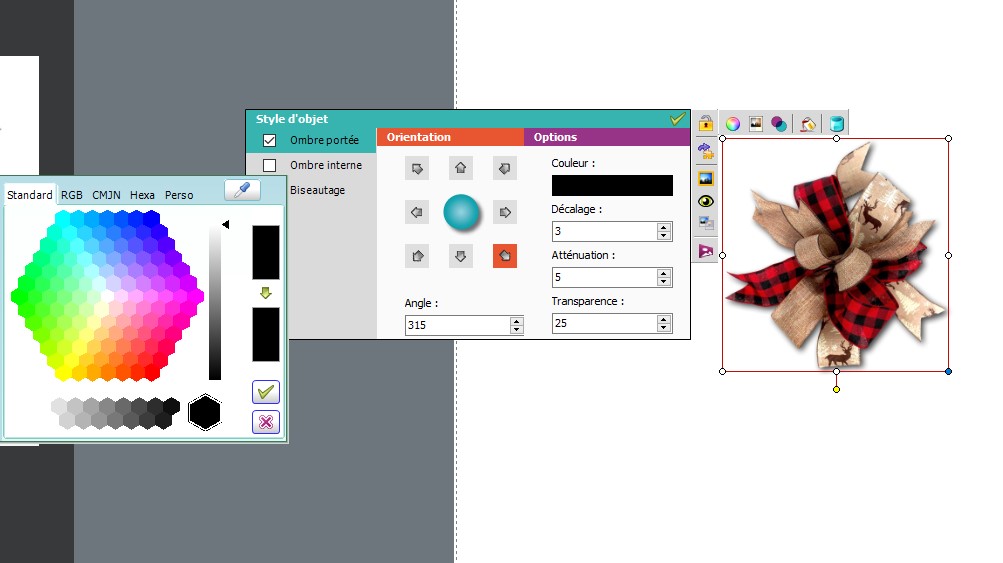
I did a screenshot with my little shadow program, I'm not sure with what to play. I usually play with the transparency now but not sure with the shadow shift and the attenuation as the angle, I usually do it simply but I'm not really happy.
Just in case you have some suggestion in my case!lol!
But Thank you for the tutorial it's a lot of help!:)
21122709253424803017726367.jpg
 
This is a really great tutorial Kiana, Thank you so much! I learn lots of things I didn't especially know (for the colors you can use for the shadow, I always go with grays but never think of complimentary colors).
My only big problem is I use a software called Studio Scrap 8 and the possibilities are not a lot.
I did a screenshot with my little shadow program, I'm not sure with what to play. I usually play with the transparency now but not sure with the shadow shift and the attenuation as the angle, I usually do it simply but I'm not really happy.
Just in case you have some suggestion in my case!lol!
But Thank you for the tutorial it's a lot of help!:)
21122709253424803017726367.jpg


As far as color? I see you have tabs at the top of your color panel. Can you select the tab that says RGB? That would be where you could put in the dark brown (or complementary color) 6-digit #hex code. Can you do that? Also can you type in the angle you want where it says 315? You could change that to 120° or 45° if you wanted?
 
This is a really great tutorial Kiana, Thank you so much! I learn lots of things I didn't especially know (for the colors you can use for the shadow, I always go with grays but never think of complimentary colors).
My only big problem is I use a software called Studio Scrap 8 and the possibilities are not a lot.
21122709253424803017726367.jpg

I use a different program as well. I tried to do some translating and comparing your settings to mine. This may be way off, but see if this gets you any closer to something you like.

Increase your decalage setting to 10 (maybe try 15 as well).
Decrease your attenuation to 1 or 2
Increase your transparency to 40 or 50
If you're using the red, bottom right, corner arrow for your orientation angle, leave that as it is.
This is mostly an educated guess comparing your settings to what I see in my Artisan Forever program and some of Kiana's settings.
 
I use a different program as well. I tried to do some translating and comparing your settings to mine. This may be way off, but see if this gets you any closer to something you like.

Increase your decalage setting to 10 (maybe try 15 as well).
Decrease your attenuation to 1 or 2
Increase your transparency to 40 or 50
If you're using the red, bottom right, corner arrow for your orientation angle, leave that as it is.
This is mostly an educated guess comparing your settings to what I see in my Artisan Forever program and some of Kiana's settings.


Thanks....hopefully this helps her!!! :thumbup:
 
Hope you like it and it can help enlighten some ways I approach my shadows. :thumbup:

Even though the settings are quite different between our two programs, if nothing else, it's a great reminder that not every item should get the same depth of shadowing. Wayyyyyyyy back in the beginning I played with shadowing my text. No, just no. :D Glad I figured that out quickly!
 
Your tutorial is awesome! Getting the right shadowing can sometimes be so frustrating! There are limitations as to what you can do in PSE but I got the Elements+ plugin and now I have a lot more options available to me if I know where to look, lol. One other shadowing that I'd like to know a little more about is how to "lift" a paper off the page so it looks more dimensional. Thank you for your tutorial Kiana, I now have a better understanding of shadowing :)
 
Kiana and Jennifer, wow Thank you so much! You both are so lovely to take time to read (and translate) and help me with your great advices and ideas!
I'm really grateful!
Kiana, I'm going to try the color part and Jennifer, glad to know I'm not the only one with another software. This is really nice to you to take time to compare with yours, I'm going to try what you suggest. Normally I can do all you told me, the thing is to find the right way to apply it.
So again Thank you, I was really looking for other tips from another scrappers because I try a lot of things but turn around! lol!
Someone is going to give some try with shadow tonight!:D
It's really great to share with another scrappers and again Kiana your tutorial is really great, can't wait to see the next!
One thing I also enjoy is you open it without closed rules!:)
thank-you-cute-wolf.gif
 
Even though the settings are quite different between our two programs, if nothing else, it's a great reminder that not every item should get the same depth of shadowing. Wayyyyyyyy back in the beginning I played with shadowing my text. No, just no. :D Glad I figured that out quickly!

Ah I did this too... A long time ago...:p
 
Thank you for the tutorial. A few things were things I could apply to my scrapping but most of it wasn't as my program does not handle shadowing this way at all.

I will say though that because of the way my program does shadowing, I do shadow my text but you wouldn't know it... it just makes my bold text look even more bold.
 
Thank you for the tutorial. A few things were things I could apply to my scrapping but most of it wasn't as my program does not handle shadowing this way at all.

I will say though that because of the way my program does shadowing, I do shadow my text but you wouldn't know it... it just makes my bold text look even more bold.

Gotcha. Yeah it's tough sometimes when your programs don't match, but I'm glad even some of the tips could help!
 
Even though the settings are quite different between our two programs, if nothing else, it's a great reminder that not every item should get the same depth of shadowing. Wayyyyyyyy back in the beginning I played with shadowing my text. No, just no. :D Glad I figured that out quickly!

Ha, I've tried shadowing text before....and you're right, no, just no!
 
Your tutorial is awesome! Getting the right shadowing can sometimes be so frustrating! There are limitations as to what you can do in PSE but I got the Elements+ plugin and now I have a lot more options available to me if I know where to look, lol. One other shadowing that I'd like to know a little more about is how to "lift" a paper off the page so it looks more dimensional. Thank you for your tutorial Kiana, I now have a better understanding of shadowing :)

Ohhhh I love lifted papers. Maybe I can do a special shadowing next!! :D
 
Back
Top