

breakingbrie
New member
Something that's been bothering me forever, and I don't know how to make it stop 
 https://flic.kr/p/SB9xwb
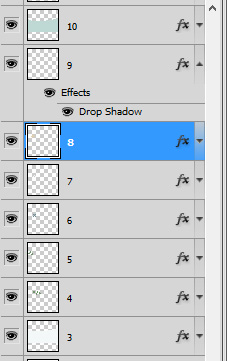
Here's my layers. When I add a style, see how the little layer thingy has the drop down menu and it shows the style I have on layer 9? How do I get it to not open up like that when I apply the style, is what I'm wondering. Way back when, my CS2 never did that, and I've just never gotten used to it in CS5. I like to have them all small-like the way the other layers are. And when I put a style on, it pops down and then I have to go click the little arrow to hide it, because it just annoys me. It's driving me crazy. It seriously messes with my flow. Anyone know the setting (I so hope there IS one) that will stop that from happening?
https://flic.kr/p/SB9xwb Here's my layers. When I add a style, see how the little layer thingy has the drop down menu and it shows the style I have on layer 9? How do I get it to not open up like that when I apply the style, is what I'm wondering. Way back when, my CS2 never did that, and I've just never gotten used to it in CS5. I like to have them all small-like the way the other layers are. And when I put a style on, it pops down and then I have to go click the little arrow to hide it, because it just annoys me. It's driving me crazy. It seriously messes with my flow. Anyone know the setting (I so hope there IS one) that will stop that from happening?


 ) so I thought maybe something else was happening. So happy to be able to zoom in easily again!