I'm in love with 'layer bounds' in my layers panel!

Arual

New member
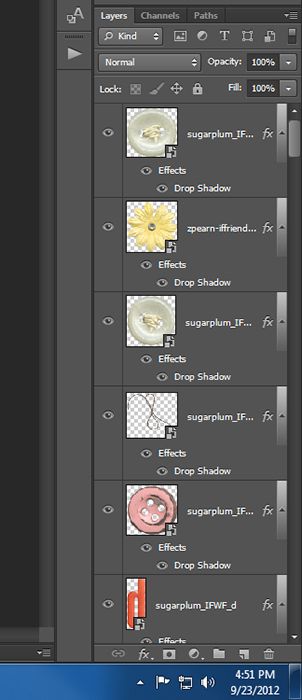
I must have been living under a rock, til today, I never tried the option of "layer bounds" in my layers panel - and whooaaa what a nice difference, I can seeeeee my elements much better now in the panel! Im in love ... lol

:wub:

Anyone wanna share other quick tips that they love?
 
Thanks for mentioning that, I've never selected that before... now I can't believe what I've been missing all this time!!!!!
 
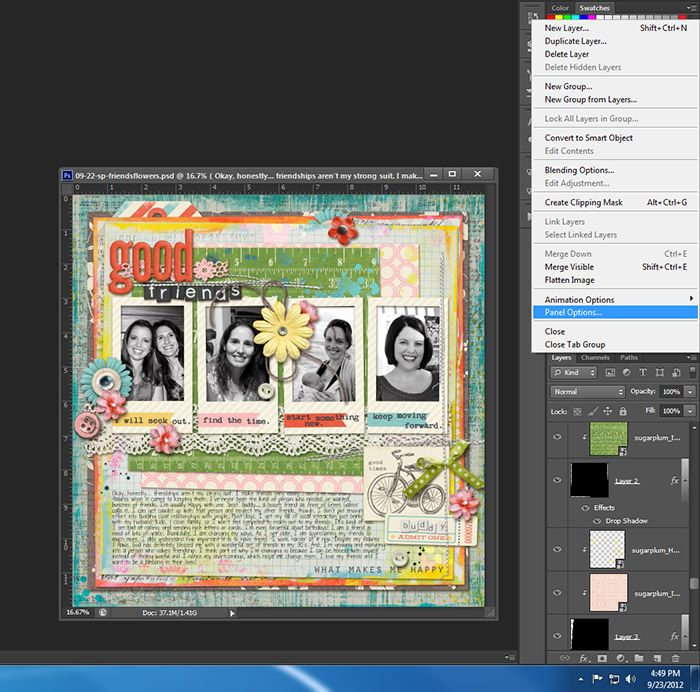
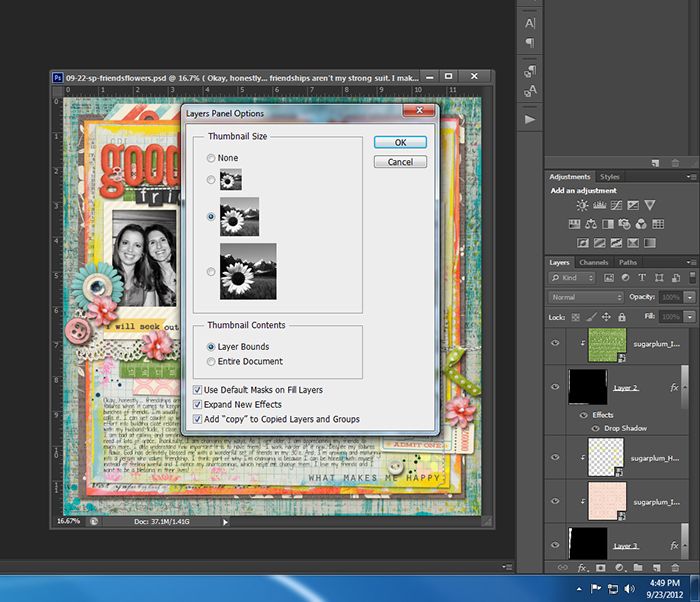
Here are some screenshots... not only can you see the actual close-up of the object, but you can also change the size of your layer thumbnail.

Fullscreen-capture-9232012-44911-PM_zps8ae901a2.jpg

Fullscreen-capture-9232012-44924-PM_zpsf5ef2d80.jpg

Fullscreen-capture-9232012-45125-PM_zps429427a2.jpg


(I'm in CS6)
 
Whoa...I apologize for the POSTER size screen shot! LOL! Guess thats what I get for being on a huge screen.... eeeek!
 
I'm pretty sure it goes all the way down to CS2 and is in PSE 10 for sure - I can't scrap unless I can see my elements in the preview thing. It's one of the first things I figured out when I switched to Photoshop from my old, old program. It's an awesome trick!!

I have that - and I always make it so that I zoom in with the scroll wheel on my mouse. Oh and I changed my short cut keys so that my "back-up" is Ctrl+Z instead of ... I think it was Ctrl+Shift+Z. That way I can keep clicking Ctrl+Z until I get back to the step that I want. Those are the few things I can think of that I've changed. Oh I also have my history pallet thing save way more steps than what it normally saves. Like 200 or more I think. Sometimes I need to back up more than a couple steps - and the default is something small like 25 steps. That doesn't work for me - especially if I'm editing photos :)

All of those are in preferences (I'm pretty sure). I'm not on my main computer right now - so I can't check :)

 
I am so slow sometimes...lol! I am over here thinking "well, that isn't changing anything...what am I missing?!?!" I really don't pay attention very well. That is neat option though...great share ladies! :)
 
wow, this is the first time someone has posted something that I already knew, lol.

I love layers bound. It makes ALL the difference.

:-)
 
I am so slow sometimes...lol! I am over here thinking "well, that isn't changing anything...what am I missing?!?!" I really don't pay attention very well. That is neat option though...great share ladies! :)

Here is the difference... look at the thumbnails:

With LAYER BOUNDS chosen...
Screen%20Shot%202012-09-23%20at%203.15.23%20PM.png


Without Layer Bounds chosen, instead ENTIRE DOCUMENT is chosen...
Screen%20Shot%202012-09-23%20at%203.15.51%20PM.png
 
Last edited:
Wow. I had no idea. I was half-afraid it was another one of those things not available on PSE, but I'm so excited to see that I can do that!
 
Zoom with the wheel is essential. And I have one of those fancy schmancy gaming mice and program some of the things to the buttons. My step backward is bound to this little button on the side that I just tap with my thumb. It's fabulous!

I'm pretty sure it goes all the way down to CS2 and is in PSE 10 for sure - I can't scrap unless I can see my elements in the preview thing. It's one of the first things I figured out when I switched to Photoshop from my old, old program. It's an awesome trick!!

I have that - and I always make it so that I zoom in with the scroll wheel on my mouse. Oh and I changed my short cut keys so that my "back-up" is Ctrl+Z instead of ... I think it was Ctrl+Shift+Z. That way I can keep clicking Ctrl+Z until I get back to the step that I want. Those are the few things I can think of that I've changed. Oh I also have my history pallet thing save way more steps than what it normally saves. Like 200 or more I think. Sometimes I need to back up more than a couple steps - and the default is something small like 25 steps. That doesn't work for me - especially if I'm editing photos :)

All of those are in preferences (I'm pretty sure). I'm not on my main computer right now - so I can't check :)

 
I stumbled across that last year, but didn't know about changing font previews till a few months ago, lol!

One thing I discovered this week quite by accident is that if you hold down the alt. key while dragging an image it automatically makes a copy of it. How did I never know that???? I was always doing a cntrl J and thought THAT was the shortcut, lol!
 
I stumbled across that last year, but didn't know about changing font previews till a few months ago, lol!

One thing I discovered this week quite by accident is that if you hold down the alt. key while dragging an image it automatically makes a copy of it. How did I never know that???? I was always doing a cntrl J and thought THAT was the shortcut, lol!

Val, did you know that you can also do that exact thing INSIDE of your layers panel as well?

Oh how I love all the things we can do!
 
Angie, do you know how to get the drop down when you click on the layers options? that little icon with like three lines and an arrow? Click that, then click Panel Options...
 
omg....my life just got soooooooo much easier!!!!!!!!!!!!!! that is sooooo awesome!!!!!!!!!!!!!
 
Zoom with the wheel is essential. And I have one of those fancy schmancy gaming mice and program some of the things to the buttons. My step backward is bound to this little button on the side that I just tap with my thumb. It's fabulous!

I have a fancy gaming mouse too... I really should program some of the buttons. Honestly, I've never messed with the buttons. I like my mouse for the 3 speeds and the fact that it is weighted (makes ALL the difference to me!)
 
Yay! Got it to work. That saves my eyes a little. ;) I am working to set my PSCS5 back up to my specifications after reformatting and reinstalling. It is such a pain!
 
Back
Top