Cool new features!

Leablahblah

Well-known member
Talking in different threads about the new features we're discovering, I thought it'd be good to have one place to go back to with tips and tricks.

For example @Scrap-therapy pointed out that we could just resize our signature directly from the settings. How cool is that?

Click on your username in the top right corner
Click on signature in the left column
Click on the siggie once and then you can drag the corners to make it smaller or bigger.

What else have you noticed?
 
Last edited:
We can't add a layout into multiple galleries anymore (say for a template designer and kit designer) because it creates duplicates. So pick one gallery then add designer tags. There is even one for store collabs now. Just type in collab and it will appear.

To add tags to your layouts

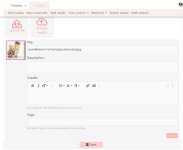
you can simply add them at the same time you're uploading your layout and adding your credits and tags.Screenshot 2026-03-01 110015.jpg


To add tags to already uploaded layout

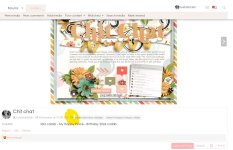
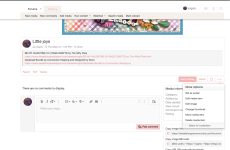
click the little tag icon below the layout, highlighted in yellow belowScreenshot 2026-03-01 105724.jpg
 
Last edited:
We can't add a layout into multiple galleries anymore (say for a template designer and kit designer) because it creates duplicates. So pick one gallery then add designer tags. There is even one for store collabs now. Just type in collab and it will appear.

To add tags to your layouts

you can simply add them at the same time you're uploading your layout and adding your credits and tags.View attachment 675968

To add tags to already uploaded layout

click the little tag icon below the layout, highlighted in yellow belowView attachment 675966
Just I don't manage to add the name in the tag, do you used a @ before or something? I want to tag @sweetdoll and @Amber Dixon
 
for Amber it's going to be Alchemy Wild... so start typing alchemy and the option will pop up

for sweet doll it looks like it's missing. Let me email Robin. Robin has to create all those tags manually.
Yes I just realize it! Thank you Lea! I'll waiting! I manage to add Amber! Thank you! :giggle:
 
Didn't you find my tag? Robin will probably create it later; she'll be a little absent today, but she should be back tomorrow to continue fixing the small details that appear throughout the week 🥰
 
We can't add a layout into multiple galleries anymore (say for a template designer and kit designer) because it creates duplicates. So pick one gallery then add designer tags. There is even one for store collabs now. Just type in collab and it will appear.

To add tags to your layouts

you can simply add them at the same time you're uploading your layout and adding your credits and tags.


To add tags to already uploaded layout

click the little tag icon below the layout, highlighted in yellow below

We will soon have a dedicated FAQ for this. It's currently being prepared 😎
 
I have a question about how to edit a layout in the gallery. I posted my layout, but I noticed something I wanted to fix, so I updated the layout. But I don't see any spot where I can upload a new layout over the existing one. Does that make sense? In the older gallery, you could just upload a new version. So help would be great!
 
I have a question about how to edit a layout in the gallery. I posted my layout, but I noticed something I wanted to fix, so I updated the layout. But I don't see any spot where I can upload a new layout over the existing one. Does that make sense? In the older gallery, you could just upload a new version. So help would be great!
I just watch and don't find this option either
 
I have a question about how to edit a layout in the gallery. I posted my layout, but I noticed something I wanted to fix, so I updated the layout. But I don't see any spot where I can upload a new layout over the existing one. Does that make sense? In the older gallery, you could just upload a new version. So help would be great!

A Babe just noticed this too. Robin is taking some time off today with family, the last few days have been so crazy for her, but I'm sure these things will have a workaround or solution in the next few weeks <3
 
What are we using for just adding a layout to Member gallery? I like to put my layouts just in my gallery first and foremost in case a designer leaves, or a challenge system leaves. I never post to any other gallery but my own first. So, is there a member gallery or what are we using?

Just so you all know, I HATE change and this is giving me some anxiety...so, show kindness if it has already been addressed elsewhere.
 
Also, is there a way to see the layouts we favorited? I had about 6 pages of layouts that I was slowly scraplifting or had plans to scraplift in the future. Are they all just gone?
 
Also, is there a way to see the layouts we favorited? I had about 6 pages of layouts that I was slowly scraplifting or had plans to scraplift in the future. Are they all just gone?
Same for me. I hope they can be recovered somehow. Let’s wait for Robin to come back on tomorrow.

And I don’t know about the above question either. I was adding to the first designer that comes up on my layout but that doesn’t seem fair. 😂
 
@Leablahblah
I just wanted to say thanks for all the help you've been giving. 🤩
I'm in a little daze still and haven't figured out everything yet. lol But, it's fun. 🥰

And, any one else that's chimed in with tips (@Scrap-therapy I know and probably others) thank you ladies!
I'm learning from you, too.
Off I go to evening church and will check things out some more this evening/night.
 
ok so I think if we want to receive notifications of a new comment on our layouts we need to hit the Watch button for each layout we post

or... to be tested

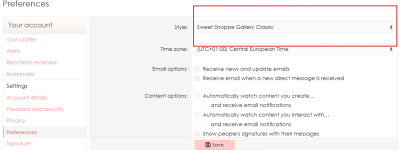
go to your account preferences and choose
Content options
  • Automatically watch content you create…
 
Last edited:
What are we using for just adding a layout to Member gallery? I like to put my layouts just in my gallery first and foremost in case a designer leaves, or a challenge system leaves. I never post to any other gallery but my own first. So, is there a member gallery or what are we using?

Just so you all know, I HATE change and this is giving me some anxiety...so, show kindness if it has already been addressed elsewhere.
looks like Robin added the Members gallery now.
 
@Leablahblah
I just wanted to say thanks for all the help you've been giving. 🤩
I'm in a little daze still and haven't figured out everything yet. lol But, it's fun. 🥰

And, any one else that's chimed in with tips (@Scrap-therapy I know and probably others) thank you ladies!
I'm learning from you, too.
Off I go to evening church and will check things out some more this evening/night.
It’s night here’s but I have to say I have a great day discovering a part of the forum and gallery with Lea!☺️ Have a great time at the evening church. 🙏🏻
 
Back
Top